
Dockerization
Machine learning servers are deployed as Docker containers to ensure consistency and scalability. LitServe streamlines this by automatically generating Dockerfiles, speeding up packaging and deployment.
Background
Containerization
Containerization is the practice of bundling an application with all its necessary dependencies into a lightweight, isolated unit called a container. This ensures the application runs consistently across different environments, enhancing portability and simplifying deployment.
Docker
Docker is a containerization platform that lets developers package applications and their dependencies into lightweight, portable containers. This ensures consistent environments across development, testing, and production, streamlining deployment and scaling processes.
Deployment
Deployment refers to the process of making an application available for use. It involves transferring the application from a development environment to a production environment where it can be accessed by users.
Automatic Dockerization
LitServe automates the process of creating a Dockerfile using the litserve dockerize CLI command.
Dockerize CLI command
"litserve dockerize" command simplifies creating Docker containers for server applications by automatically generating a Dockerfile from the server code, enabling easy building and running of the container.
litserve dockerize [-h] [--port PORT] [--gpu] server_filenameParameters
Example: litserve dockerize server.py --port 8000 --gpu
# server.py
import litserve as ls

if __name__ == "__main__":
    server = ls.LitServer(ls.test_examples.SimpleLitAPI())
    server.run(port=8000)

############################################# Run in terminal #######################################
litserve dockerize server.py --port 8000 --gpu
Generate a Dockerfile
In this example, we run a simple dummy server which returns the square of the input number. We implement the server as follows:
# server.py
import litserve as ls

class SimpleLitAPI(ls.LitAPI):
    def setup(self, device):
        self.model = lambda x: x ** 2

    def decode_request(self, request):
        return request["input"]

    def predict(self, x):
        return self.model(x)

    def encode_response(self, output):
        return {"output": output}

if __name__ == "__main__":
    server = ls.LitServer(SimpleLitAPI())
    server.run(port=8000)
To generate a Dockerfile for the server, use the litserve dockerize command by providing the path to the server code as follows:
litserve dockerize server.py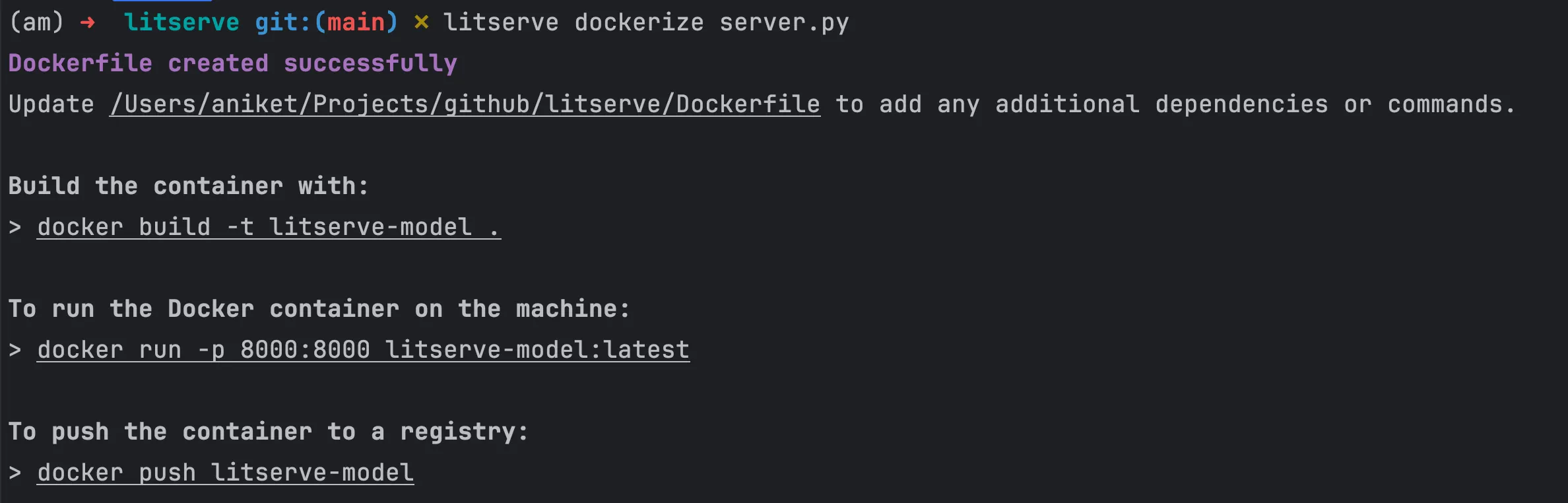
The dockerize command generates a Dockerfile to build the container that can be run and deployed to cloud.
FROM python:3.12-slim

####### Add your own installation commands here #######
# RUN pip install some-package
# RUN wget https://path/to/some/data/or/weights
# RUN apt-get update && apt-get install -y <package-name>

WORKDIR /app
COPY . /app

# Install litserve and requirements
RUN pip install --no-cache-dir litserve -r requirements.txt
EXPOSE 8000
CMD ["python", "/app/server.py"]
Dockerization for GPUs
To Dockerize a server that requires Nvidia GPUs, add the --gpu flag as follows:
litserve dockerize server.py --gpuIt generates a Dockerfile that uses an Nvidia base image for GPU support and installs Python 3.10 and LitServe.
# Change CUDA and cuDNN version here
FROM nvidia/cuda:12.4.1-cudnn-runtime-ubuntu20.04

ENV DEBIAN_FRONTEND=noninteractive
RUN apt-get update && apt-get install -y --no-install-recommends \
        software-properties-common \
        wget \
    && add-apt-repository ppa:deadsnakes/ppa \
    && apt-get update && apt-get install -y --no-install-recommends \
        python3.12 \
        python3.12-dev \
        python3.12-venv \
    && wget https://bootstrap.pypa.io/get-pip.py -O get-pip.py \
    && python3.12 get-pip.py \
    && rm get-pip.py \
    && ln -sf /usr/bin/python3.12 /usr/bin/python \
    && ln -sf /usr/local/bin/pip3.12 /usr/local/bin/pip \
    && python --version \
    && pip --version \
    && apt-get purge -y --auto-remove software-properties-common \
    && apt-get clean \
    && rm -rf /var/lib/apt/lists/*

####### Add your own installation commands here #######
# RUN pip install some-package
# RUN wget https://path/to/some/data/or/weights
# RUN apt-get update && apt-get install -y <package-name>

WORKDIR /app
COPY . /app

# Install litserve and requirements
RUN pip install --no-cache-dir litserve -r requirements.txt
EXPOSE 8000
CMD ["python", "/app/server.py"]
Build and run container
After generating the Dockerfile, the next steps involve building the Docker image and running the container.
Use the docker build command to create a Docker image from the generated Dockerfile as follows:
docker build -t litserve-model .Run the Docker container using the docker run command:
docker run -p 8000:8000 litserve-modelThe above command starts the container, making the server accessible on the specified port 8000.
Conclusion
LitServe Dockerize CLI enhances the containerization process by automating Dockerfile generation. The generated Dockerfile can be updated to include any additional packages and dependencies.
Was this page helpful?
Thanks for the feedback.