
Model Context Protocol (MCP) servers
AI model integrations typically require one-off adapters, REST-only APIs, or manual wrappers per client - resulting in high integration complexity and fragmented workflows. LitServe supports MCP (Model Context Protocol), allowing any AI model to become accessible via MCP-compatible clients like Claude desktop or IDEs such as Cursor. This makes it seamless to integrate ML models directly into a local development environment or custom tools.
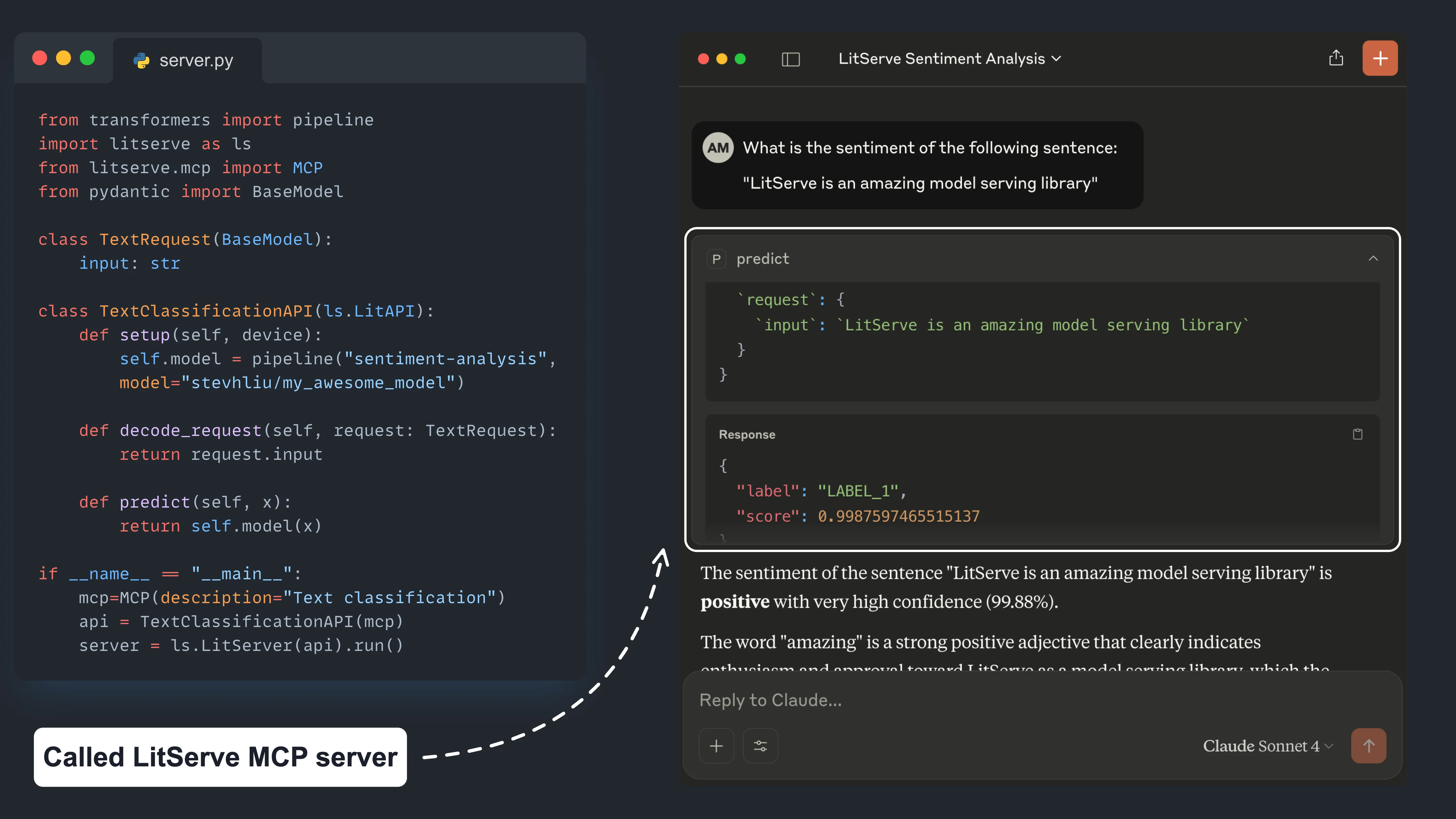
Overview
What is MCP?
Model Context Protocol (MCP) is an open standard for local AI assistants. It defines how tools like desktop clients or IDEs communicate with model APIs using structured, bidirectional messaging over HTTP. MCP clients can send structured prompts to MCP servers and receive structured responses—like chat completions, code edits, or classifications.
LitServe MCP
LitServe integrates MCP via a dedicated /mcp/ endpoint that exposes any LitAPI subclass as an MCP-compatible tool. It uses the official MCP HTTP stream spec and requires no changes to model logic.
Benefits
- Plug into Claude or Cursor without additional code
- Keep using your existing LitAPI class
- Enable structured chat, classification, or code-assist workflows
- Follows the official MCP streamable HTTP spec
MCP LitServe API
We enable MCP by passing an MCP(...) object to our LitAPI subclass. This registers an additional /mcp/ endpoint while preserving the existing API behavior.
Server
This example serves a Hugging Face sentiment model over both REST and MCP:
from transformers import pipeline
from pydantic import BaseModel
from litserve.mcp import MCP
import litserve as ls

class TextClassificationRequest(BaseModel):
    input: str

class TextClassificationAPI(ls.LitAPI):
    def setup(self, device):
        self.model = pipeline("sentiment-analysis", model="stevhliu/my_awesome_model", device=device)

    def decode_request(self, request: TextClassificationRequest):
        return request.input

    def predict(self, x):
        return self.model(x)

    def encode_response(self, output):
        return output[0]

if __name__ == "__main__":
    api = TextClassificationAPI(mcp=MCP(description="Classifies sentiment in text"))
    server = ls.LitServer(api)
    server.run(port=8000)
Once running, MCP clients can connect to http://localhost:8000/mcp.
Connecting to Claude desktop
Once our LitServe API is running with MCP enabled, we can connect it to Claude Desktop using one of the following methods:
- Open Claude Desktop’s config file:
- macOS: ~/Library/Application Support/Claude/claude_desktop_config.json
- Windows: %APPDATA%\Claude\claude_desktop_config.json**
If mcp-remote is not already available on the system, install it globally:
npm install -g mcp-remoteAdd the following configuration:
{
  "mcpServers": {
    "litserve": {
      "command": "npx",
      "args": ["mcp-remote", "http://localhost:8000/mcp/"]
    }
  }
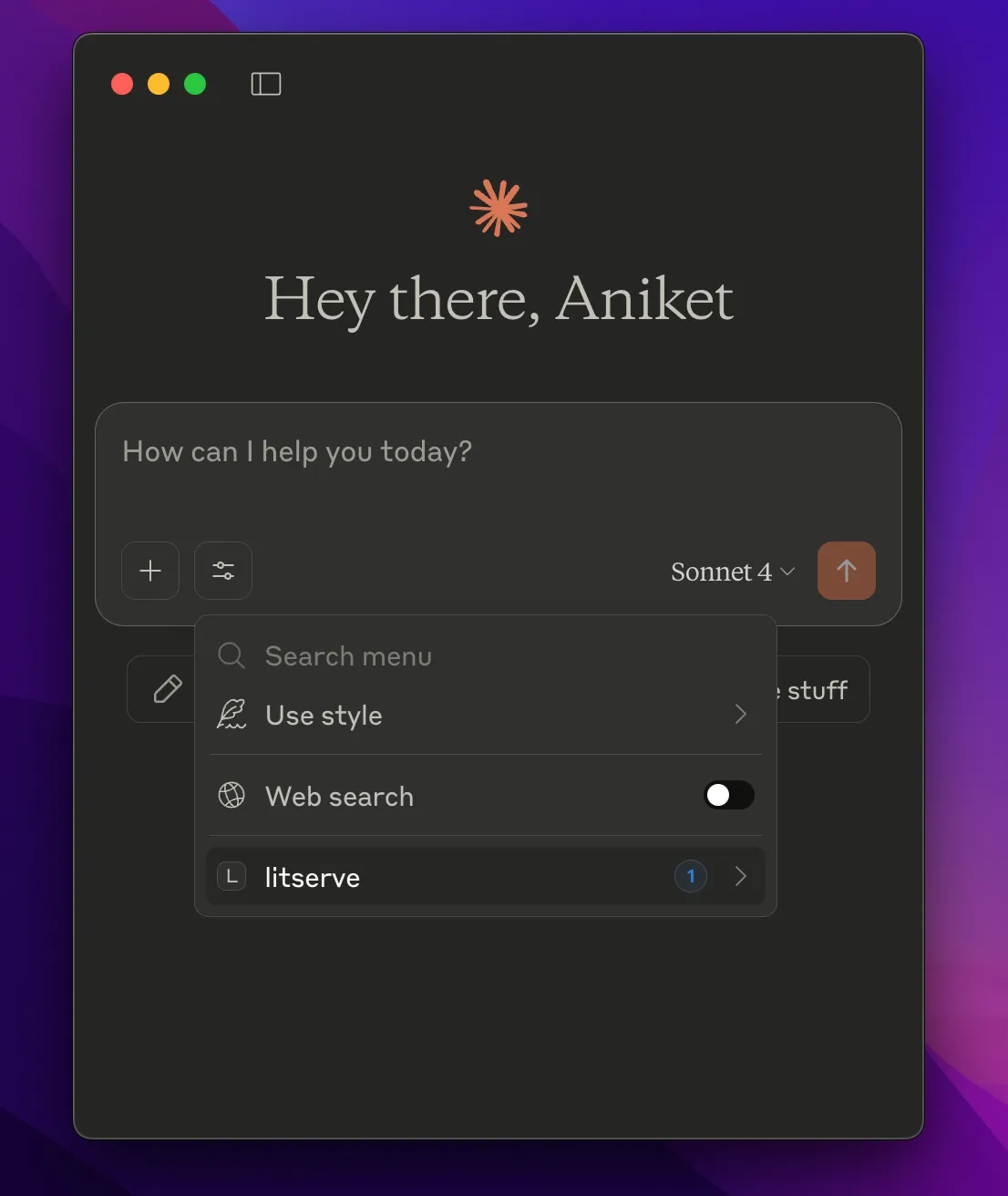
}- Restart Claude Desktop. We should now see a tool icon (🛠️ or slider) next to the input field.
MCP options
We configure the MCP(...) object in our LitAPI like this:
MCP(
  name="classifier",
  description="Classifies sentiment in text",
  input_schema={...}  # Optional
)
Available options and their functionality:
name (optional): The unique name for our tool. This name is used for tool discovery and invocation via tools/list and tools/call. If not provided, LitServe derives it from the
api_path(e.g./predictbecomes predict).description (required): A short, human-friendly description of what the tool does (e.g., "Classifies sentiment in text"). This will appear in the UI of MCP-compatible clients.
input_schema (optional): A JSON Schema definition that describes the tool's expected arguments. Providing it manually improves accuracy, especially for tools with structured input. If omitted, LitServe attempts to infer this from our
decode_request()method using type annotations.
Example input schema: The input schema for the above sentiment analysis server would like following:
{
  "type": "object",
  "properties": {
    "input": {
      "type": "string",
      "description": "Text to analyze"
    }
  },
  "required": ["input"]
}
Tool lifecycle
When MCP is enabled:
- LitServe registers a Tool using MCP’s tool schema
- The tool is mounted on
/mcp/using a streamable HTTP handler - Clients use
tools/listto discover it andtools/callto send structured requests
Common challenges in MCP integration
Schema not detected
If input schema is not correctly inferred, MCP tools may misinterpret our API.
To fix this, define input_schema explicitly:
MCP(description="...", input_schema={...})Conclusion
With LitServe's new MCP integration, we can connect our ML APIs directly to popular desktop AI tools and IDEs with zero glue code. This opens up rich new interaction modes—classification, chat, summarization, and more—all backed by models we control.
Start your server, and let your models join the AI ecosystem!
Was this page helpful?
Thanks for the feedback.