
Logging and Debugging
Troubleshooting AI model servers can be difficult. Multiple processes and data formats make it hard to know where things go wrong. LitServe helps by providing tools that make errors easier to find and logs easier to read.
Without good logs or debugging tools, errors take longer to fix. LitServe speeds up this process. It gives clear logs and a built-in debugger that works even when running multiple processes.
Overview
Debugger
A debugger pauses the program and shows what’s happening at that exact point. It reveals variable values, the current line, and how the program got there. This helps trace bugs step by step.
pdb
pdb is Python’s built-in debugger. It runs in the terminal and pauses your code so you can see what’s happening. (LitServe provides a pdb alternative as covered below.)
To start debugging with pdb, insert this line where you want the pause:
import pdb; pdb.set_trace()When the program reaches that line, it stops. You can then type commands to inspect or move through the code.
Common commands:
p x— print the value of xn— run the next linec— continue until the next breakpointq— quit the debugger
Logging
Logging tracks what the program does while it runs. Unlike print(), logs include timestamps, severity levels, and consistent formatting. Python’s built-in logging module provides this out of the box.
import logging

logging.basicConfig(level=logging.INFO)
logging.info("Server started")
logging.warning("Something might be wrong")
logging.error("Something went wrong")
Debugger with LitServe
LitServe includes a custom set_trace() function. It works like pdb.set_trace() but supports multiple processes. Use it to pause the server during a request and inspect what’s happening.
import litserve as ls

class SquareAPI(ls.LitAPI):
    def setup(self, device):
        self.model = lambda x: x**2

    def decode_request(self, request):
        return request["input"]

    def predict(self, x):
        ls.set_trace()
        result = self.model(x)
        return {"output": result}

    def encode_response(self, output):
        return {"output": output}

if __name__ == "__main__":
    server = ls.LitServer(SquareAPI())
    server.run(port=8000)
The program stops when it hits ls.set_trace(). Use the terminal to check variables and understand the program flow.
Logging with LitServe
LitServe supports the standard Python logging module. It also includes helpers to control log levels, format logs cleanly, and add rich-text styling for better readability.
Logs help trace request flow, detect slowdowns, and debug issues quickly—without digging through scattered print statements.
For example, the following server triggers an error, and the terminal shows a well-formatted traceback that's easy to read and debug.
import litserve as ls

ls.configure_logging(use_rich=True)

class SimpleLitAPI(ls.LitAPI):
    def setup(self, device):
        self.model1 = lambda x: x**2
        self.model2 = lambda x: x**3

    def decode_request(self, request):
        return request["input"]

    def predict(self, x):
        a = self.model1(x)
        b = self.model2(x)
        c = a + b
        return {"output": c}

    def encode_response(self, output):
        return {"output": output}

if __name__ == "__main__":
    server = ls.LitServer(SimpleLitAPI(enable_async=True))
    server.run(port=8000)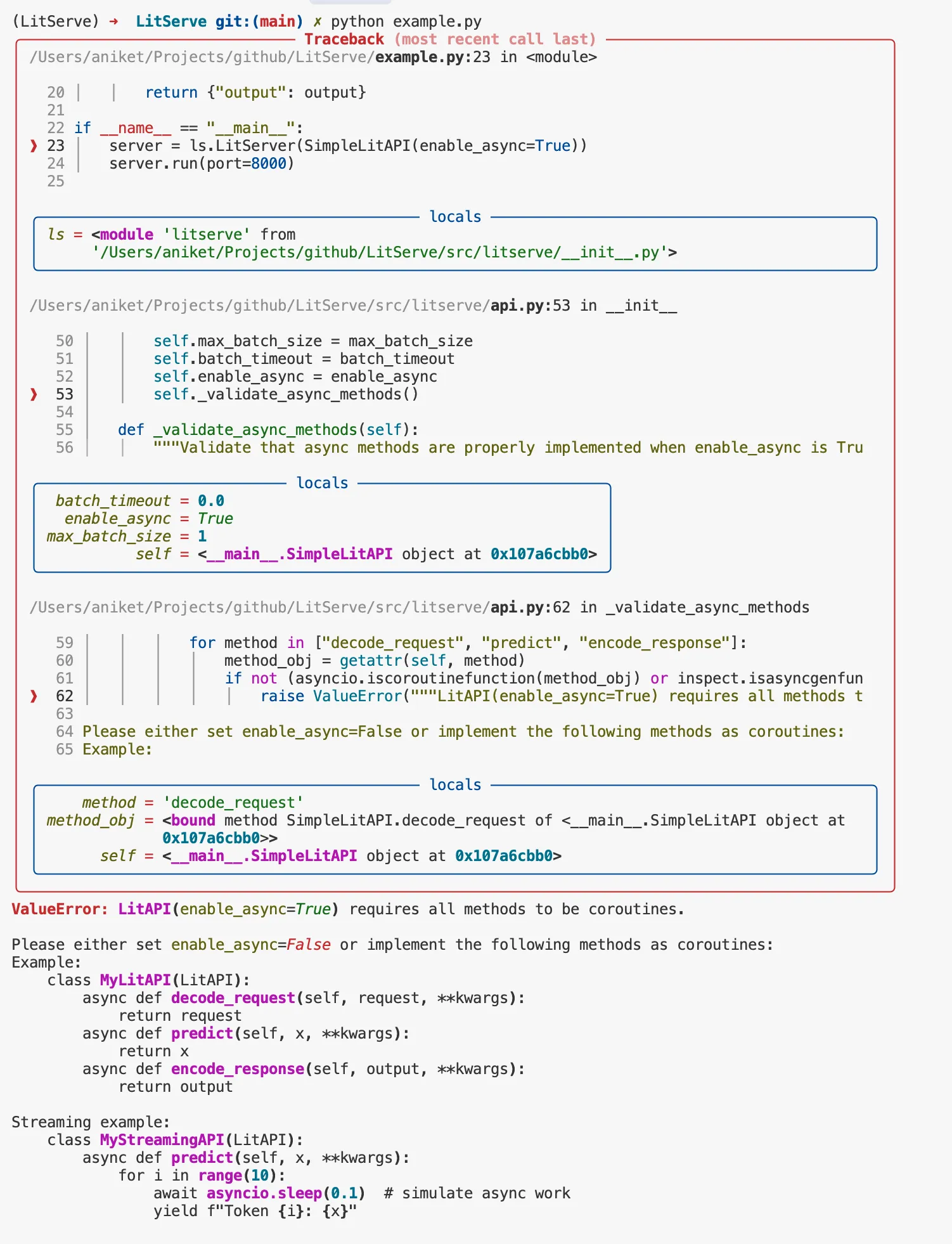
Conclusion
Good logs and a working debugger save time. They make it easier to understand what your model server is doing and where it breaks. LitServe gives both—built-in logging with helpful formatting and a debugger that works across processes.
These tools help catch bugs faster, track problems clearly, and keep development moving smoothly.
Was this page helpful?
Thanks for the feedback.