
OpenAI spec
Modern AI language model deployments have standardized on a server input/output standard called OpenAI spec. This standard guarantees the format of inputs going into the server and information returned from the server such as token count, and other parameters typically used for AI models.
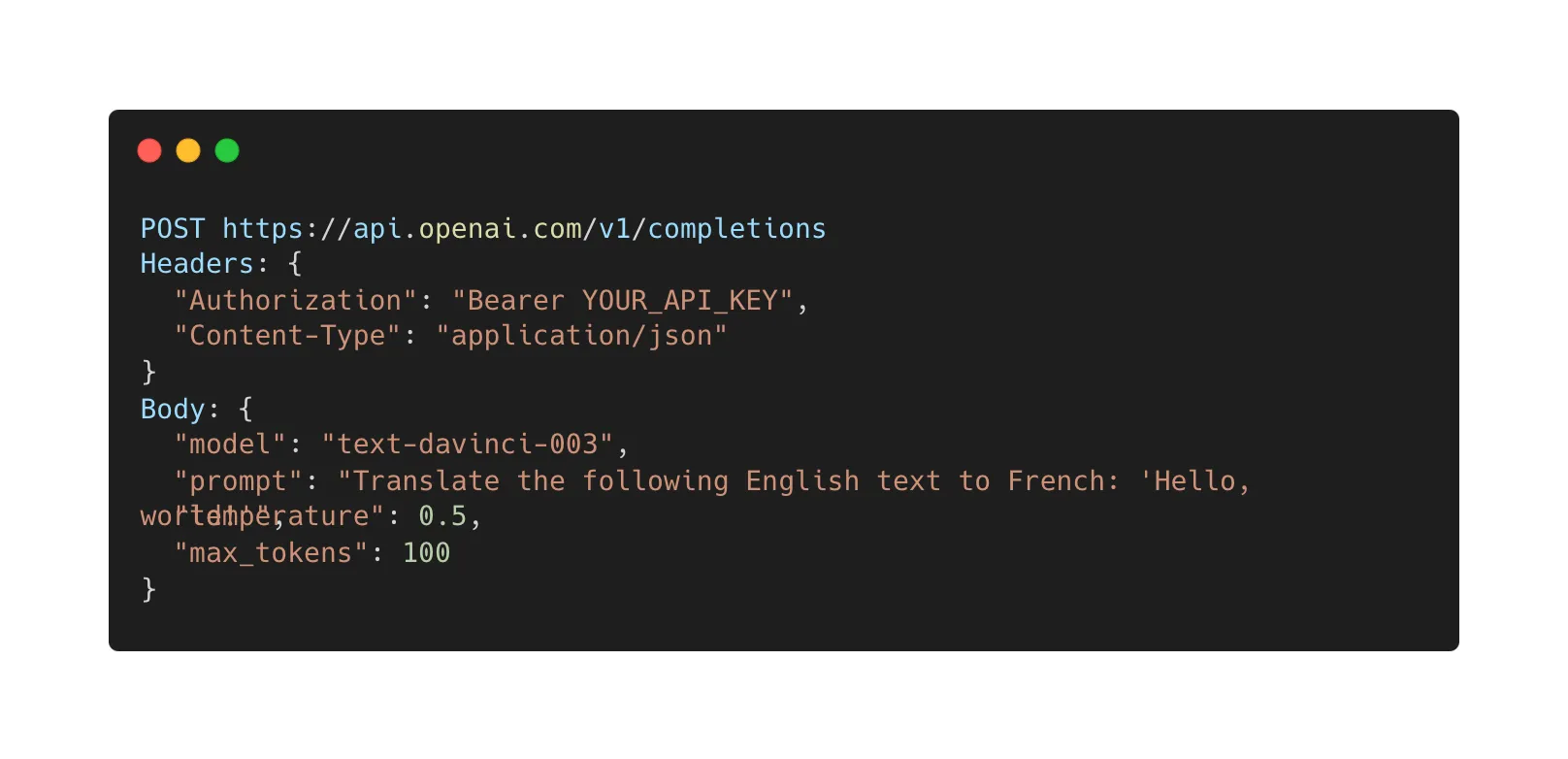
If you are familiar with web services, the OpenAI spec is like the OpenAPI spec but for AI models. This standard is useful to allow AI microservices to communicate with each other using the same standards. LitServe APIs can conform to the OpenAI standard using the LitServe OpenAI spec.
Background
OpenAI
API
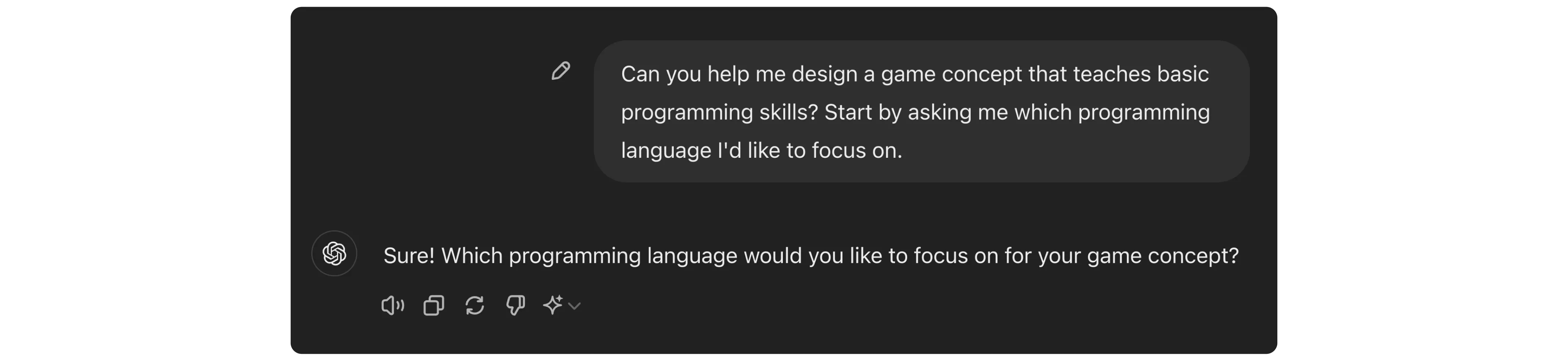
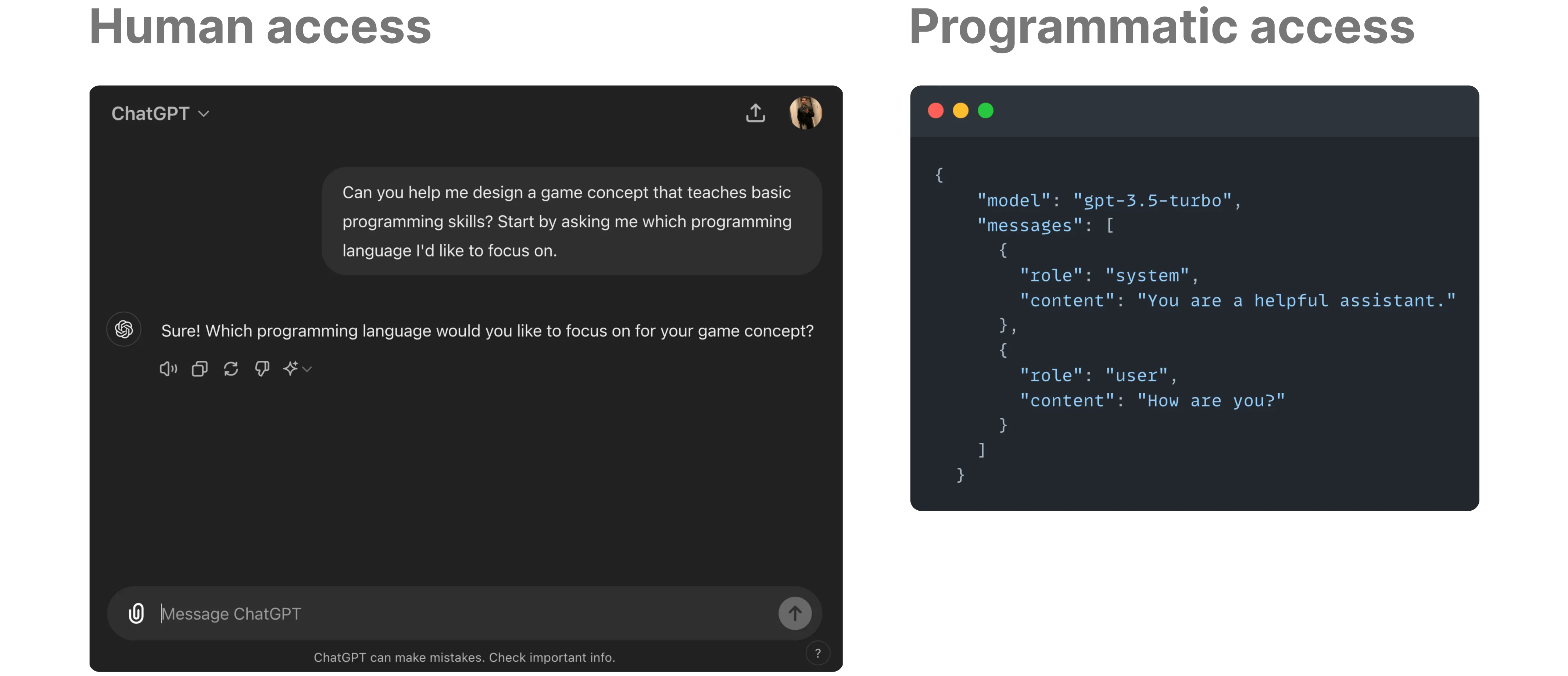
A model *Application Programming Interface *(API) is a programmatic way to access a model. It allows us to use the model through code (instead of a chat window).
OpenAI API
OpenAI services (like ChatGPT) have a standard API specification for sending requests and receiving responses programmatically for text generation and other tasks.
It is widely used by various AI tools and libraries like LangChain, Ollama, and LlamaIndex. Adopting this format simplifies integration for clients already working with OpenAI APIs.
API Request
To use an API, we send requests with input parameters such as text prompts. Every API has a specified structure for requests that clients must follow.
LitServe defines a ChatCompletionRequest data structure based on the OpenAI input request specification. The input request includes a list of messages for text generation and other model-related parameters to control the generated output. Find all the specified parameters in this format here.
Below is a typical sample input request:
{
   "model": "gpt-3.5-turbo",
   "messages": [{"role": "user", "content": "Say this is a test!"}],
}
API Response
The API returns the response data in a format known to the client, allowing it to parse the response for further processing. OpenAI uses two response formats depending on the case: streaming and non-streaming.
In case of non-streaming, LitServe returns a ChatCompletionResponse object based on OpenAI standard response format, which contains the generated output text and a few usage metrics.
When streaming, it sends continuous responses in chunks as ChatCompletionChunk objects. These chunks contain the generated output so that partial results can be received continuously. Learn about the parameters used in this format here.
OpenAI & LitServe integration
LitServe uses the OpenAISpec class to adhere to the OpenAI API specification, making it compatible with existing AI tools and frameworks, including LangChain, Ollama, and LlamaIndex.
Enable OpenAI API in LitServe
LitServe simplifies the process of creating an OpenAI API compatible server using the OpenAISpec class.
The OpenAISpec class offers the following functionalities:
- Defines standard endpoints (
/v1/chat/completions). - Handles both streaming and non-streaming requests.
- Validates and transforms input and output data.
- Implements default methods for
decode_requestandencode_response.
In the following sections, we will cover the standard server (non-streaming mode), streaming server and some advanced functionalities to control the model.
Standard server
We refer to the non-streaming approach of serving an OpenAI compatible API as a standard server. We will use the OpenAISpec class to run LitServe as an OpenAI API compatible server.
A straightforward way to serve a model with OpenAISpec is as follows:
- Implement the
predictmethod to yield the output instead of returning it. OpenAISpecclass automatically handles thedecode_requestandencode_responsemethods.- Enable the
OpenAISpecin theLitAPIimplementation.
import litserve as ls

class SimpleLitAPI(ls.LitAPI):
    def setup(self, device):
        self.model = None

    def predict(self, prompt):
        # `prompt` is a list of dictionary containing role and content
        # example: [{'role': 'user', 'content': 'How can I help you today?'}]
        yield "This is a sample generated output"

if __name__ == "__main__":
    # Enable the OpenAISpec in LitServer
    api = SimpleLitAPI(spec=ls.OpenAISpec())
    server = ls.LitServer(api)
    server.run(port=8000)
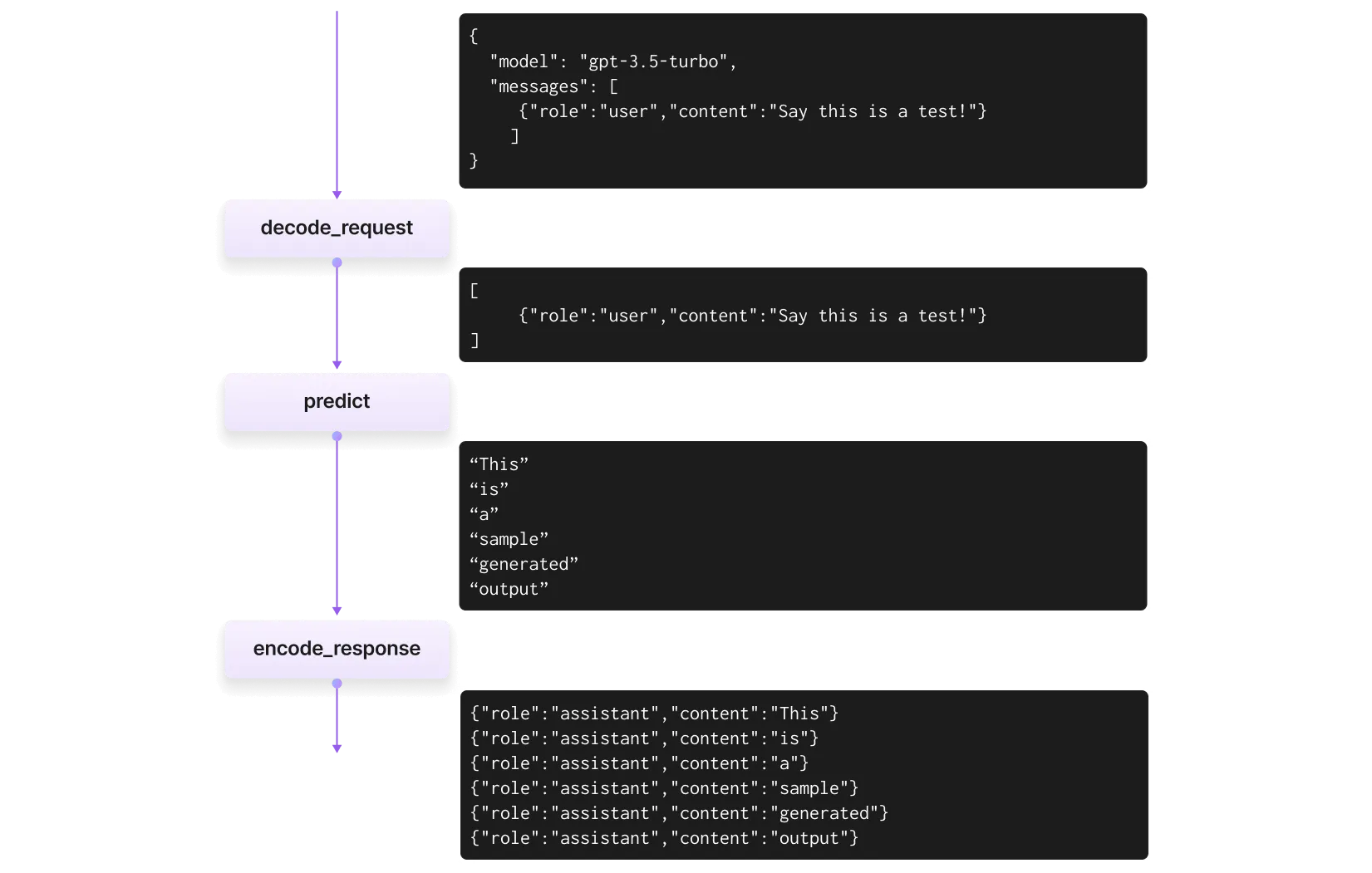
The following image illustrates the data flow through the decode_request, predict, and encode_response methods when handling an API request for the server defined above:
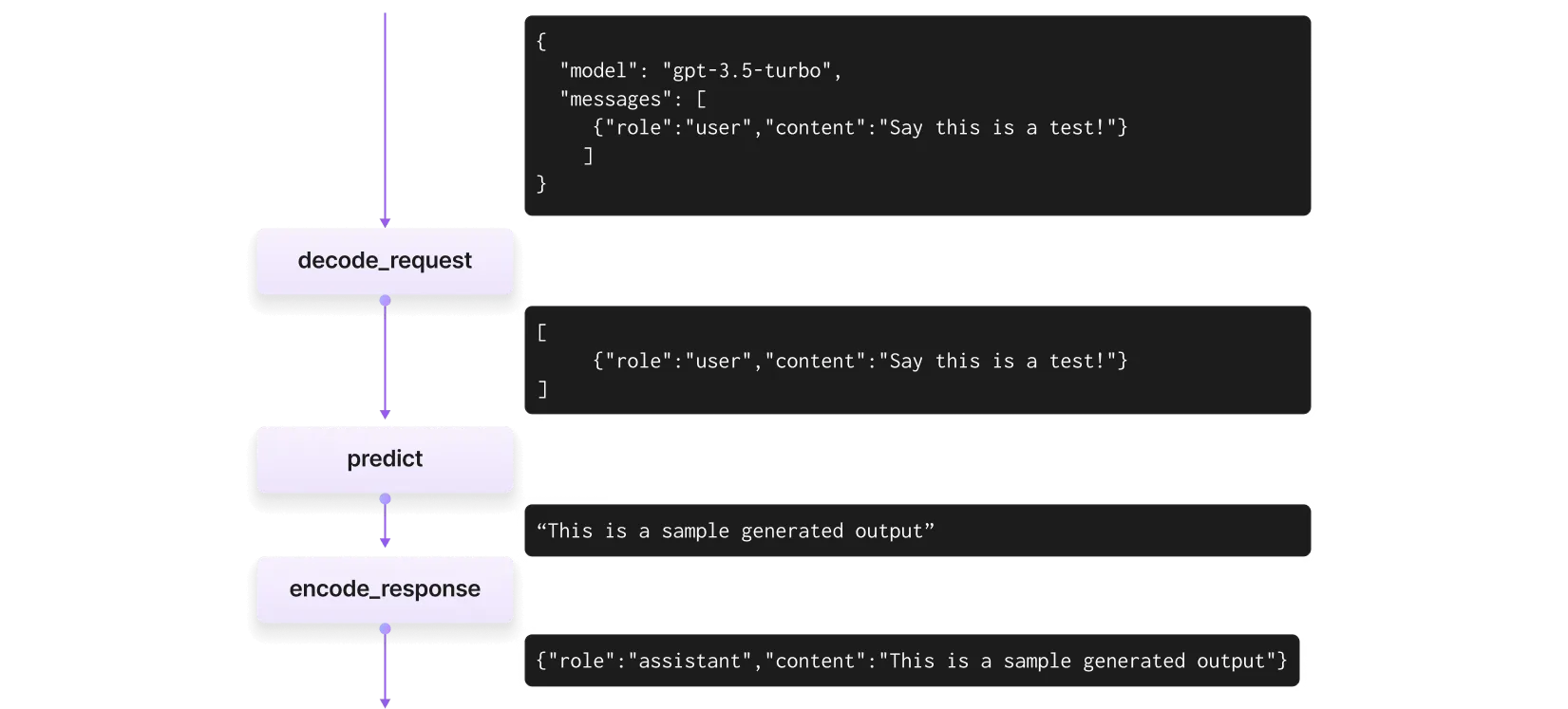
The predict method gets its input from the decode_request method. The decode_request method takes the ChatCompletionRequest, formats it, and returns the messages parameter as a list of dictionaries with role and content.
The encode_response method then uses the output from predict. It creates a dictionary that includes the generated content and sets the role as assistant.
Make a request to the server by sending a ChatCompletionRequest compliant request as follows:
import requests

# OpenAI API standard endpoint
SERVER_URL = "http://127.0.0.1:8000/v1/chat/completions"

request_data = {
    "model": "my-gpt2",
    "messages": [
        {"role": "system", "content": "You are a helpful assistant."},
        {"role": "user", "content": "How are you?"}
    ]
}

if __name__ == "__main__":
    response = requests.post(SERVER_URL, json=request_data)
    print(response.json())
Streaming server
OpenAISpec can stream the generated output in a word-by-word fashion, similar to the ChatGPT UI. OpenAI specifies a stream parameter in the input request, which, when set to True, expects the server to stream the content in chunks of messages.
LitServe's OpenAISpec class automatically handles streaming and sends the generated output in chunks. You can yield the partially generated output from the predict method and LitServe will send it as a chunk to the client.
The following image illustrates the data flow through the decode_request, predict, and encode_response methods when handling a streaming API request:
Here is an example to demonstrate the use of OpenAISpec with streaming:
import litserve as ls

class SimpleLitAPI(ls.LitAPI):
    def setup(self, device):
        self.model = None

    def predict(self, prompt):
        for chunk in "This is a sample generated output".split():
            yield chunk
            # This
            # is
            # a
            # sample
            # generated
            # output

if __name__ == "__main__":
    api = SimpleLitAPI(spec=ls.OpenAISpec())
    server = ls.LitServer(api)
    server.run(port=8000)
Make a request to the server by setting the stream parameter to True as follows:
import requests

# OpenAI API standard endpoint
SERVER_URL = "http://127.0.0.1:8000/v1/chat/completions"

request_data = {
    "model": "my-gpt2",
    "stream": True,  # This must be True for streaming response
    "messages": [
        {"role": "user", "content": "How can I help you today?"}
    ]
}

if __name__ == "__main__":
    response = requests.post(SERVER_URL, json=request_data, stream=True)
    for chunk in response.iter_lines():
        print(chunk.decode("utf-8"))
The client receives continuous chunks of responses as follows:
data: {"id":"chatcmpl-4e5ba6","object":"chat.completion.chunk","created":1717761663,"model":"my-gpt2","system_fingerprint":null,"choices":[{"delta":{"role":"assistant","content":"This","name":null,"tool_calls":null,"tool_call_id":null},"finish_reason":null,"index":0,"logprobs":null}],"usage":null}

data: {"id":"chatcmpl-64a09d","object":"chat.completion.chunk","created":1717761663,"model":"my-gpt2","system_fingerprint":null,"choices":[{"delta":{"role":"assistant","content":"is","name":null,"tool_calls":null,"tool_call_id":null},"finish_reason":null,"index":0,"logprobs":null}],"usage":null}

data: {"id":"chatcmpl-bce07f","object":"chat.completion.chunk","created":1717761663,"model":"my-gpt2","system_fingerprint":null,"choices":[{"delta":{"role":"assistant","content":"a","name":null,"tool_calls":null,"tool_call_id":null},"finish_reason":null,"index":0,"logprobs":null}],"usage":null}

data: {"id":"chatcmpl-356e19","object":"chat.completion.chunk","created":1717761663,"model":"my-gpt2","system_fingerprint":null,"choices":[{"delta":{"role":"assistant","content":"sample","name":null,"tool_calls":null,"tool_call_id":null},"finish_reason":null,"index":0,"logprobs":null}],"usage":null}

data: {"id":"chatcmpl-1ca125","object":"chat.completion.chunk","created":1717761663,"model":"my-gpt2","system_fingerprint":null,"choices":[{"delta":{"role":"assistant","content":"generated","name":null,"tool_calls":null,"tool_call_id":null},"finish_reason":null,"index":0,"logprobs":null}],"usage":null}

data: {"id":"chatcmpl-fcab4f","object":"chat.completion.chunk","created":1717761663,"model":"my-gpt2","system_fingerprint":null,"choices":[{"delta":{"role":"assistant","content":"output","name":null,"tool_calls":null,"tool_call_id":null},"finish_reason":null,"index":0,"logprobs":null}],"usage":null}

data: {"id":"chatcmpl-7158c0","object":"chat.completion.chunk","created":1717761663,"model":"my-gpt2","system_fingerprint":null,"choices":[{"delta":{"role":null,"content":null,"name":null,"tool_calls":null,"tool_call_id":null},"finish_reason":"stop","index":0,"logprobs":null}],"usage":null}

data: [DONE]
Standard + Streaming
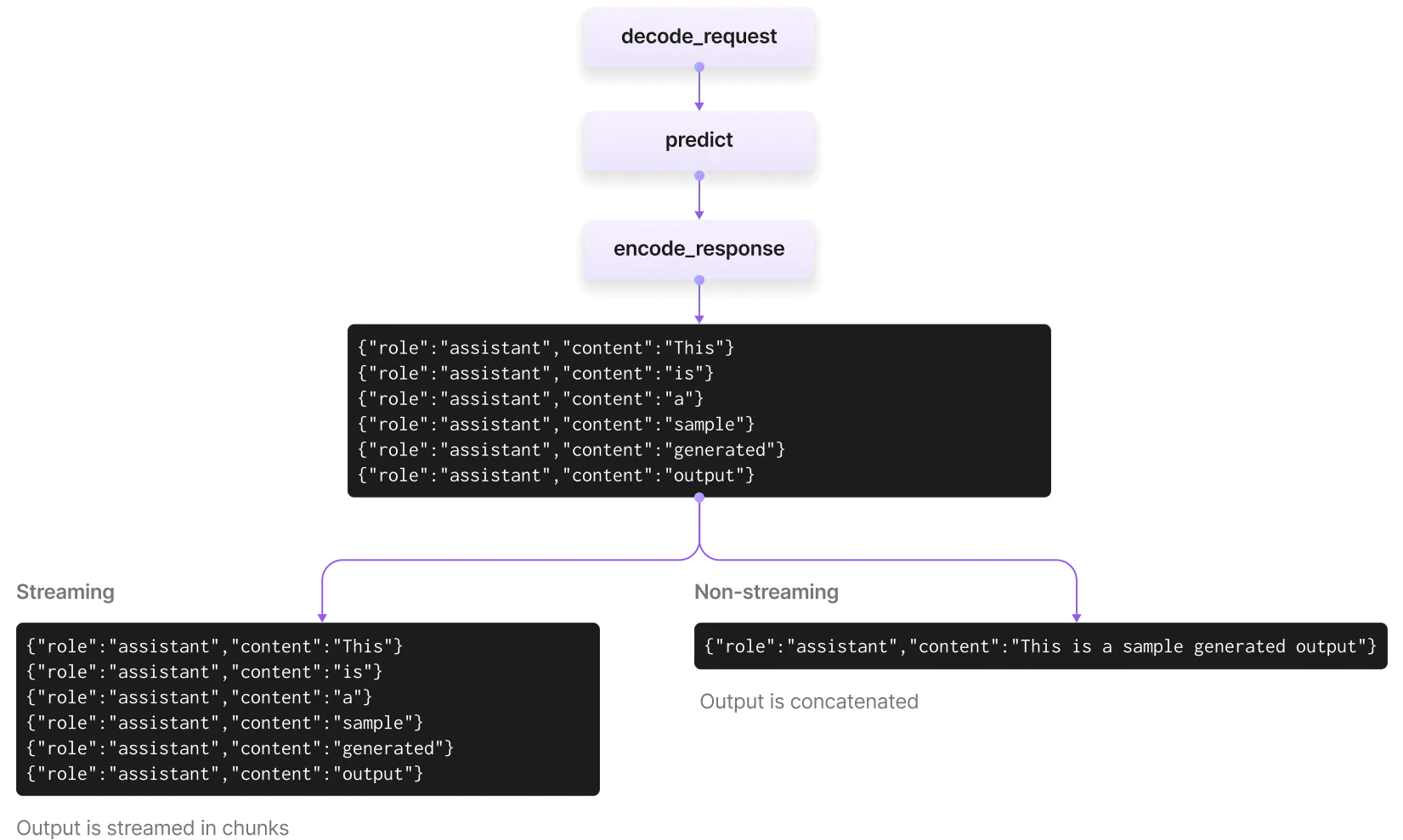
LitServe integrates both streaming and non-streaming flows, handling both types of requests with a single LitAPI implementation. The server will return the appropriate response, either streaming or non-streaming, based on the stream parameter of the input ChatCompletionRequest.
The following image illustrates the data flow for handling streaming and non-streaming requests:
Let's explore this process with the following toy example.
import litserve as ls

class SimpleLitAPI(ls.LitAPI):
    def setup(self, device):
        self.model = None

    def predict(self, prompt):
        for chunk in "This is a sample generated output".split():
            yield chunk + " "
            # This
            # is
            # a
            # sample
            # generated
            # output

if __name__ == "__main__":
    api = SimpleLitAPI(spec=ls.OpenAISpec())
    server = ls.LitServer(api)
    server.run(port=8000)
This is the same example that we used above for a streaming server. In the case of a standard (non-streaming) request, LitServe concatenates the yielded chunks from the predict method into a single content and returns the ChatCompletionResponse containing generated output as follows:
{
  'id': 'chatcmpl-d7c82a',
  'object': 'chat.completion',
  'created': 1718307805,
  'model': 'my-gpt2',
  'choices': [
    {
      'index': 0,
      'message': {
        'role': 'assistant',
        'content': 'This is a sample generated output'
      },
      'finish_reason': 'stop'
    }
  ],
  'usage': {
    'prompt_tokens': 0,
    'total_tokens': 0,
    'completion_tokens': 0
  }
}
For a streaming request, when you set stream=True in the input request, LitServe sends the yielded output from the predict method as continuous chunks to the client.
If your LLM generates the whole text at once, the client will receive that text as a single chunk and stop streaming. When you yield output word-by-word (or token-by-token), LitServe keeps sending the partially generated output to the client as continuous ChatCompletionChunk objects as follows:
data: {"id":"chatcmpl-4e5ba6","object":"chat.completion.chunk","created":1717761663,"model":"my-gpt2","system_fingerprint":null,"choices":[{"delta":{"role":"assistant","content":"This","name":null,"tool_calls":null,"tool_call_id":null},"finish_reason":null,"index":0,"logprobs":null}],"usage":null}

data: {"id":"chatcmpl-64a09d","object":"chat.completion.chunk","created":1717761663,"model":"my-gpt2","system_fingerprint":null,"choices":[{"delta":{"role":"assistant","content":"is","name":null,"tool_calls":null,"tool_call_id":null},"finish_reason":null,"index":0,"logprobs":null}],"usage":null}

data: {"id":"chatcmpl-bce07f","object":"chat.completion.chunk","created":1717761663,"model":"my-gpt2","system_fingerprint":null,"choices":[{"delta":{"role":"assistant","content":"a","name":null,"tool_calls":null,"tool_call_id":null},"finish_reason":null,"index":0,"logprobs":null}],"usage":null}

data: {"id":"chatcmpl-356e19","object":"chat.completion.chunk","created":1717761663,"model":"my-gpt2","system_fingerprint":null,"choices":[{"delta":{"role":"assistant","content":"sample","name":null,"tool_calls":null,"tool_call_id":null},"finish_reason":null,"index":0,"logprobs":null}],"usage":null}

data: {"id":"chatcmpl-1ca125","object":"chat.completion.chunk","created":1717761663,"model":"my-gpt2","system_fingerprint":null,"choices":[{"delta":{"role":"assistant","content":"generated","name":null,"tool_calls":null,"tool_call_id":null},"finish_reason":null,"index":0,"logprobs":null}],"usage":null}

data: {"id":"chatcmpl-fcab4f","object":"chat.completion.chunk","created":1717761663,"model":"my-gpt2","system_fingerprint":null,"choices":[{"delta":{"role":"assistant","content":"output","name":null,"tool_calls":null,"tool_call_id":null},"finish_reason":null,"index":0,"logprobs":null}],"usage":null}

data: {"id":"chatcmpl-7158c0","object":"chat.completion.chunk","created":1717761663,"model":"my-gpt2","system_fingerprint":null,"choices":[{"delta":{"role":null,"content":null,"name":null,"tool_calls":null,"tool_call_id":null},"finish_reason":"stop","index":0,"logprobs":null}],"usage":null}

data: [DONE]
Side effects of OpenAISpec
OpenAISpec requires that both the predict and encode_response methods support yielding output. This design choice enables LitServe to seamlessly handle two types of requests:
- Streaming chat-completion: Clients receive partial tokens as they’re generated.
- Non-streaming requests: The full response is buffered and sent once complete.
Examples
Text Completion with GPT-2
This is an example of a text completion API with GPT-2.
from transformers import pipeline
import litserve as ls

class GPT2LitAPI(ls.LitAPI):
    def setup(self, device):
        self.generator = pipeline('text-generation', model='gpt2', device=device)

    def predict(self, prompt):
        out = self.generator(prompt[0]["content"])[0]
        yield out["generated_text"]

if __name__ == '__main__':
    api = GPT2LitAPI(spec=ls.OpenAISpec())
    server = ls.LitServer(api)
    server.run(port=8000)
The video below demonstrates running the server and shows the client's response.
Text generation using GPT-2
Serve Llama 3 with LitGPT
The following example shows how to serve a Llama 3 8B model using LitGPT and LitServe, streaming the chat output:
import litgpt
import litserve as ls

class LitOpenAI(ls.LitAPI):
    def setup(self, device):
        self.llm = litgpt.LLM.load("meta-llama/Meta-Llama-3-8B-Instruct")

    def predict(self, prompt):
        yield from self.llm.generate(prompt, max_new_tokens=200, stream=True)

if __name__ == "__main__":
    api = LitOpenAI(spec=ls.OpenAISpec())
    server = ls.LitServer(api)
    server.run(port=8000)
More examples...
Advanced functionality
Dynamic batching
Dynamic batching allows you to batch concurrent requests and process them in parallel on GPUs, significantly increasing system throughput.
To enable batching in LitServe:
- Configure the
max_batch_sizeinLitAPIto a number that your GPU can handle without running out of memory. - Implement the
batchandunbatchmethods in LitAPI to handle the aggregation and disaggregation of batched requests.
Here is an example that serves a GPT-2 model with a batch size of 8.
from transformers import pipeline
import litserve as ls

class GPT2LitAPI(ls.LitAPI):
    def setup(self, device):
        self.generator = pipeline('text-generation', model='gpt2', device=device)

    def batch(self, inputs):
        return inputs

    def predict(self, prompt):
        yield self.generator(prompt)

    def unbatch(self, output):
        return output

    def encode_response(self, output_stream):
        for outputs in output_stream:
            yield [{"role": "assistant", "content": output[0]["generated_text"][-1]} for output in outputs]

if __name__ == '__main__':
    api = GPT2LitAPI(max_batch_size=8, batch_timeout=0.1, spec=ls.OpenAISpec())
    server = ls.LitServer(api)
    server.run(port=8000)
Override decode_request
Overriding the decode_request method allows you to implement custom logic before the request is processed by the predict method. This can be useful for applying guardrails, such as detecting offensive prompts.
The decode_request method expects a ChatCompletionRequest as an argument and returns messages, a list of dictionaries containing role and content. The output of decode_request is then passed into the predict method.
In this example, the decode_request method raises an exception if it detects a "BAD WORD" in the input request.
import litserve as ls

class SimpleLitAPI(ls.LitAPI):
    def setup(self, device):
        self.model = None

    def decode_request(self, request):
        content = request.messages[-1].content
        if "BAD WORD" in content:
            raise Exception("Guardrail detected inappropriate content.")
        return [{"role": "user", "content": content}]

    def predict(self, prompt):
        yield "This is a sample generated text"

if __name__ == '__main__':
    api = SimpleLitAPI(spec=ls.OpenAISpec())
    server = ls.LitServer(api)
    server.run(port=8000)
Override encode_response
You might want to customize the encode_response method to manipulate the predicted tokens. This is useful in cases where you need to modify the generated text or add additional tokens after processing.
Note that the encode_response method expects you to yield a dictionary containing role and content.
The following example overrides the encode_response method to send additional tokens after processing the generated text:
import litserve as ls

class SimpleLitAPI(ls.LitAPI):
    def setup(self, device):
        self.model = None

    def predict(self, prompt):
        yield "This is a sample generated output"

    def encode_response(self, output):
        for out in output:
            yield {"role": "assistant", "content": out}
        # Add an additional token after finishing processing
        yield {"role": "assistant", "content": "This is the final msg."}

if __name__ == '__main__':
    api = SimpleLitAPI(spec=ls.OpenAISpec())
    server = ls.LitServer(api)
    server.run(port=8000)
Track request context
LitAPI offers a unique keyword argument, context, which retains data throughout the request's lifespan. You can include this argument in decode_request, predict, and encode_response, and LitServe will inject a shared dictionary as the context value. This allows to store some data in one method and utilize it in another. The lifespan of this shared dictionary begins before decode_request and concludes after encode_response.
OpenAISpec automatically injects the input request parameters into the context, which can then be used to retrieve the value at any stage to manipulate the generated text.
Here is a toy example that demonstrate using context to store data in predict method and use it later in encode_response:
import litserve as ls

class SimpleLitAPI(ls.LitAPI):
    def setup(self, device):
        self.model = None

    def predict(self, prompt, context):
        # Retrieve request parameters
        temp = context["temperature"]
        # or store any data
        context["RANDOM_DATA"] = f"SOME_RANDOM_DATA"
        yield "This is a sample generated output"

    def encode_response(self, output, context):
        # Use the data from predict in encode_response
        data = context["RANDOM_DATA"]
        yield {"role": "assistant", "content": data}

if __name__ == '__main__':
    api = SimpleLitAPI(spec=ls.OpenAISpec())
    server = ls.LitServer(api)
    server.run(port=8000)
Max tokens
The OpenAI input request contains several parameters to manipulate the generated text. max_tokens can be used to stop generation once the number of total generated tokens has reached the max_tokens value.
The context object already contains all the input request parameters, including max_tokens. You can retrieve the max_token from the context to stop the generation, as demonstrated in the example below:
import litserve as ls

class SimpleLitAPI(ls.LitAPI):
    def setup(self, device):
        self.model = None

    def predict(self, prompt, context):
        # context contains the OpenAI request parameters
        max_tokens = context["max_tokens"]
        sentence = ["This", "is", "a", "sample", "response"]
        for count, token in enumerate(sentence, start=1):
            yield token
            if count >= max_tokens:
                return

if __name__ == "__main__":
    api = SimpleLitAPI(spec=ls.OpenAISpec())
    server = ls.LitServer(api)
    server.run(port=8000)
Stop sequence
If you wish to stop generation based on a provided string sequence such as \n, ., or a token of your choice, you can use the stop parameter to check the generated token and stop generation process.
In the following example, you can provide a stop token of your choice and generation will stop once the provided token is detected.
import litserve as ls

class SimpleLitAPI(ls.LitAPI):
    def setup(self, device):
        self.sentence = ["This", "is", "a", "sample", "response", "\n", "Thank", "you", "!"]

    def predict(self, prompt, context):
        for token in self.sentence:
            if token == context["stop"]:
                return
            yield token

if __name__ == "__main__":
    api = SimpleLitAPI(spec=ls.OpenAISpec())
    server = ls.LitServer(api)
    server.run(port=8000)
Temperature
In LLMs, the diversity of generated text can be controlled using the temperature argument provided to the models. A high temperature value leads to more randomness and creative output.
Here is an example using GPT-2, where the temperature is first retrieved from context and provided to the model for text generation.
from transformers import pipeline
import litserve as ls

class GPT2LitAPI(ls.LitAPI):
    def setup(self, device):
        self.generator = pipeline('text-generation', model='openai-community/gpt2', device=device)

    def predict(self, prompt, context):
        # temperature is retrieved from the context
        temperature = context["temperature"]
        out = self.generator(prompt, temperature=temperature)
        yield out[0]["generated_text"]

if __name__ == '__main__':
    api = GPT2LitAPI(spec=ls.OpenAISpec())
    server = ls.LitServer(api)
    server.run(port=8000)
Use OpenAI client
Query the server deployed with OpenAISpec using the OpenAI API client by following these steps:
from openai import OpenAI

# Initialize the OpenAI client
client = OpenAI(
    base_url="http://127.0.0.1:8000/v1",  # Specify your LitServe endpoint
    api_key="lit",  # The API key is required, but it can be a placeholder in this context
)

# Create a chat completion request
response = client.chat.completions.create(
    model="lit",
    messages=[
        {"role": "system", "content": "You are a helpful assistant."},
        {"role": "user", "content": "How are you?"},
    ],
)

print(response)
OpenAISpec API
decode_request
Decodes the incoming request object into a list of dictionaries representing chat messages. OpenAISpec.decode_request will be used over LitAPI.decode_request if both are implemented.
def decode_request(self, request: ChatCompletionRequest, context_kwargs: Optional[dict] = None) -> List[Dict[str, str]]Parameters
Example: In this example, the decode_request method raises an exception if it detects a "BAD WORD" in the input request.
import litserve as ls

class MyOpenAISpec(ls.OpenAISpec):
    def decode_request(self, request):
        content = request.messages[-1].content
        if "BAD WORD" in content:
            raise Exception("Guardrail detected inappropriate content.")
        return [{"role": "user", "content": content}]

class SimpleLitAPI(ls.LitAPI):
    def setup(self, device):
        self.model = None


    def predict(self, prompt):
        yield "This is a sample generated text"

if __name__ == '__main__':
    api = SimpleLitAPI()
    server = ls.LitServer(api, spec=MyOpenAISpec())
    server.run(port=8000)
encode_response
Encodes the response by transforming the output into a valid format for the API response. It validates and extracts usage information. OpenAISpec.encode_response will be used over LitAPI.encode_response if both are implemented.
def encode_response(self, output_generator: Union[Dict[str, str], List[Dict[str, str]]], context_kwargs: Optional[dict] = None) -> Iterator[Union[ChatMessage, ChatMessageWithUsage]]:Parameters
Example: The following example overrides the encode_response method to send additional tokens after processing the generated text:
import litserve as ls

class MyOpenAISpec(ls.OpenAISpec):
    def encode_response(self, output):
        for out in output:
            yield {"role": "assistant", "content": out}
        # Add an additional token after finishing processing
        yield {"role": "assistant", "content": "This is the final msg."}


class SimpleLitAPI(ls.LitAPI):
    def setup(self, device):
        self.model = None

    def predict(self, prompt):
        yield "This is a sample generated output"

if __name__ == '__main__':
    api = SimpleLitAPI()
    server = ls.LitServer(api, spec=MyOpenAISpec())
    server.run(port=8000)
Was this page helpful?
Thanks for the feedback.