
Variable precision
Variable precision is crucial for optimizing performance, particularly in GPU memory usage and computational speed. This section covers the different precision types available and their impact on memory and performance.
Note that 8-bit and 4-bit settings are not yet fully optimized for all models. Tune your server to balance memory and speed.
Background
Precision
Precision means how accurately a computer represents and processes numbers. It determines how detailed and exact the numerical values are. For example, higher precision provides more accurate results by representing numbers with more detail, which helps reduce errors in calculations.
Quantization
Quantization reduces the precision of numbers representing model parameters like weights and activation outputs. Its main aim is to decrease the model's size and improve computational efficiency, facilitating deployment on smaller GPUs.
Float32 precision
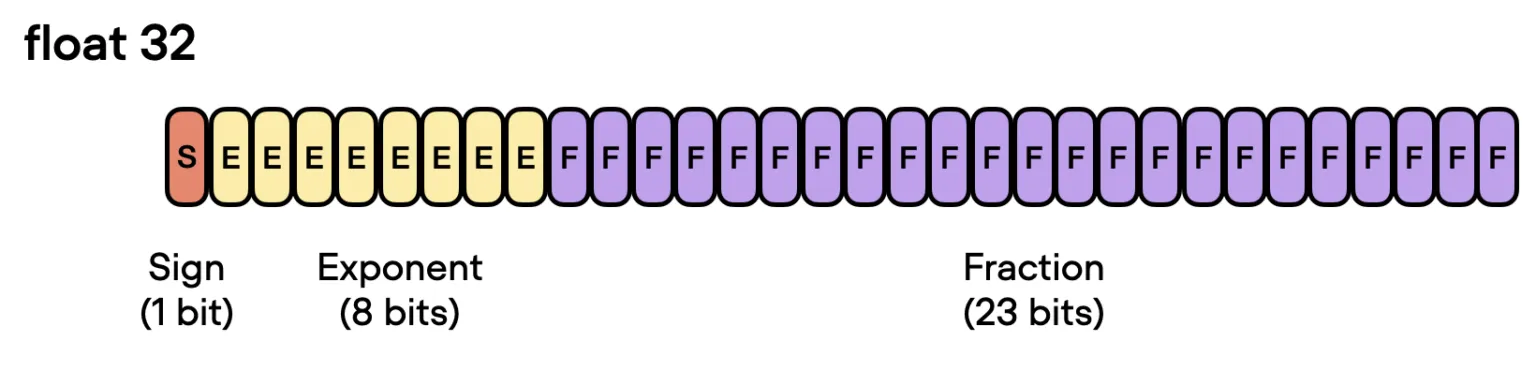
Float32, or single precision, is a format for representing floating-point numbers using 32 bits of computer memory. It provides a balance between range and accuracy and is commonly used as the default format in most machine learning frameworks.
Float16 precision
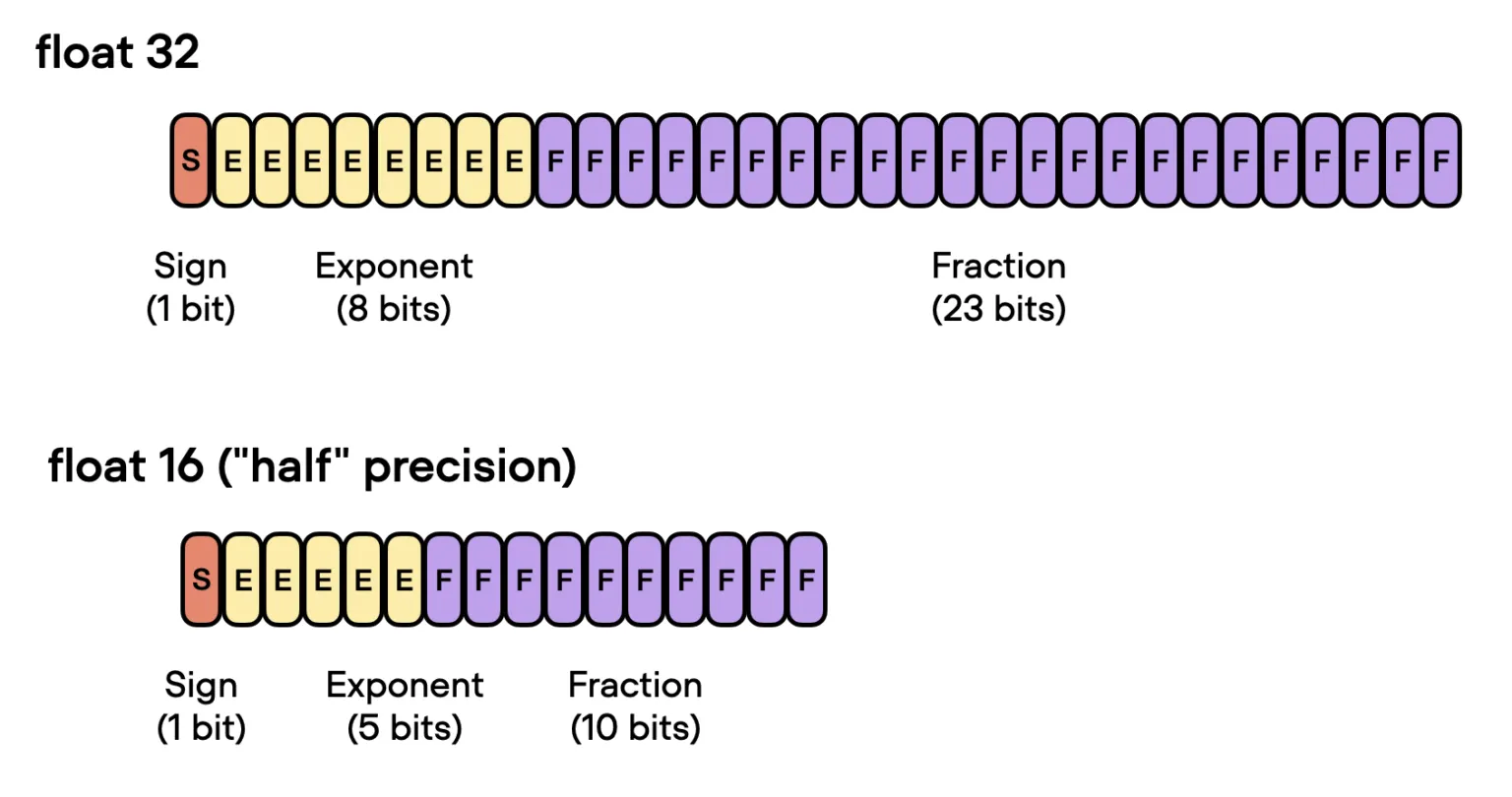
Float16, or half precision, is a format for representing floating-point numbers using 16 bits of computer memory. It is designed to provide a compact way to store and process numerical data while balancing memory usage and computational efficiency.
Float16 reduces memory consumption by half compared to float32, allowing more efficient use of GPU memory. Computation with float16 is generally faster than with float32, especially on hardware optimized for half-precision arithmetic.
Bfloat16 precision
bfloat16 (short for "brain floating-point 16") is a floating-point format that uses 16 bits of memory to represent numerical values. It is designed to balance performance and precision, particularly for machine learning and neural network computations.
Unlike float16, bfloat16 offers the same range as float32 but with reduced precision. Many modern GPUs and TPUs are built to handle bfloat16 efficiently, making computations faster.
8-bit quantization
8-bit quantization reduces the memory needed for model weights and activations by storing them in 8-bit format.
This makes it possible to run large models on hardware with limited GPU memory. However, if not done carefully, it can lead to a noticeable drop in accuracy.
4-bit quantization
4-bit quantization aggressively reduces memory usage by storing model weights and activations in a 4-bit format.
Reducing precision from 32-bit to 4-bit reduces memory usage by a factor of 8 (since 32/4 = 8). This is beneficial for deploying large models.
Low precision serving
PyTorch model
PyTorch supports 16-bit precision computations, including both float16 and bfloat16. To move the model and data to the desired precision, use model.to(torch.bfloat16).
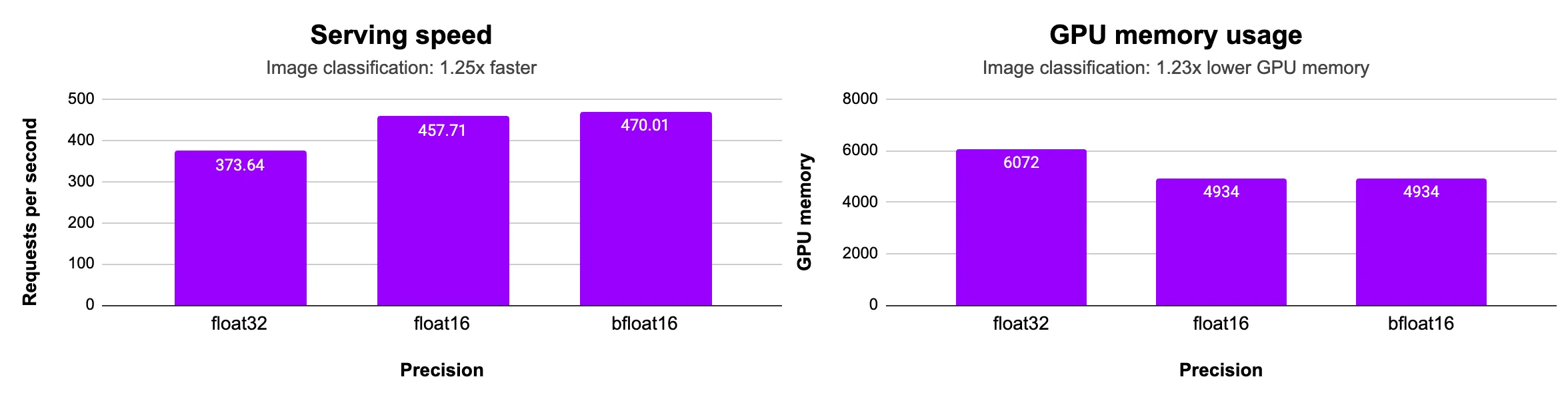
We run a PyTorch (image classification) model on an L4 GPU and record the GPU memory usage and serving speed.
from concurrent.futures import ThreadPoolExecutor
import base64, io, PIL
import torch, torchvision
import litserve as ls

class ImageClassifierAPI(ls.LitAPI):
    def setup(self, device):
        weights = torchvision.models.ResNet152_Weights.DEFAULT
        self.image_processing = weights.transforms()
        self.precision = torch.bfloat16  # or torch.float32, torch.float16
        self.model = torchvision.models.resnet152(weights=weights).eval().to(device).to(self.precision)
        self.pool = ThreadPoolExecutor(max(os.cpu_count(), 8))

    def decode_request(self, request):
        return request["image_data"]

    def batch(self, image_data_list):
        def process_image(image_data):
            image = base64.b64decode(image_data)
            pil_image = PIL.Image.open(io.BytesIO(image)).convert("RGB")
            processed_image = self.image_processing(pil_image)
            return processed_image

        inputs = list(self.pool.map(process_image, image_data_list))
        return torch.stack(inputs).to(self.device).to(self.precision)

    def predict(self, x):
        with torch.inference_mode():
            outputs = self.model(x)
            _, predictions = torch.max(outputs, 1)
        prediction_list = predictions.tolist()
        return prediction_list

    def unbatch(self, outputs):
        return outputs

    def encode_response(self, output):
        return {"output": output}

if __name__ == "__main__":
    api = ImageClassifierAPI(max_batch_size=8, batch_timeout=0.01)
    server = ls.LitServer(api, workers_per_device=8)
    server.run(port=8000)
We observe that half-precision (16-bit) uses 1.3x less GPU memory and delivers faster throughput compared to float32 precision.
HF transformers model
LitServe can serve models from any framework. In the setup method, we apply model-based optimizations such as low precision, quantization, or model compilation. The example serves a BERT-Large model from the Hugging Face Transformers library with different precisions.
import torch
from transformers import AutoModelForSequenceClassification, AutoTokenizer
import litserve as ls

class HuggingFaceLitAPI(ls.LitAPI):
    def setup(self, device):
        self.precision = torch.bfloat16
        model_name = "google-bert/bert-large-uncased"
        self.tokenizer = AutoTokenizer.from_pretrained(model_name)
        self.model = AutoModelForSequenceClassification.from_pretrained(model_name, torch_dtype=self.precision).to(device)

    def decode_request(self, request:dict):
        return request["text"]

    def batch(self, inputs):
        return self.tokenizer(inputs, return_tensors="pt", padding=True, truncation=True)

    def predict(self, inputs):
        inputs = {key: value.to(self.device) for key, value in inputs.items()}
        with torch.inference_mode():
            outputs = self.model(**inputs)
            logits = outputs.logits
        return torch.argmax(logits, dim=1)

    def unbatch(self, outputs):
        return outputs.tolist()

    def encode_response(self, output):
        return {"label_idx": output}

if __name__ == "__main__":
    api = HuggingFaceLitAPI(max_batch_size=10, batch_timeout=0.01)
    server = ls.LitServer(api, workers_per_device=1)
    server.run(port=8000)
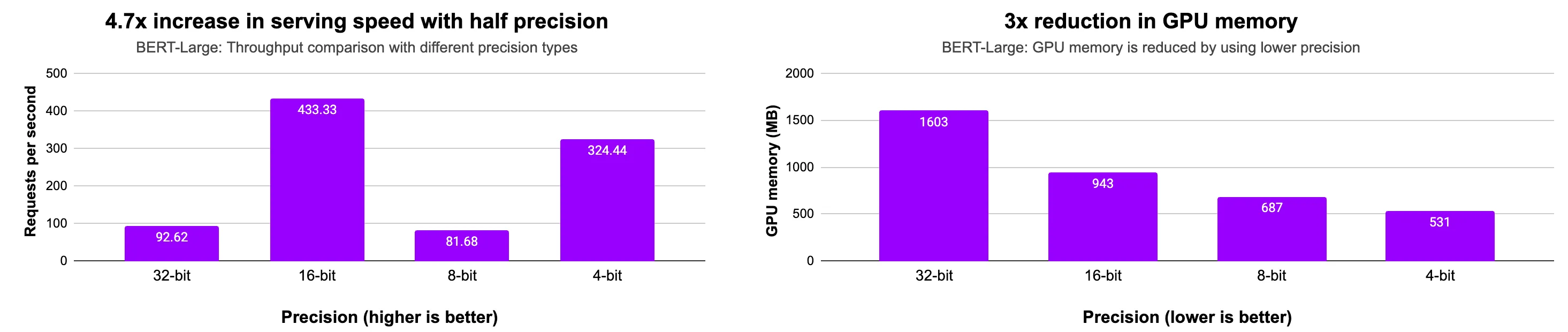
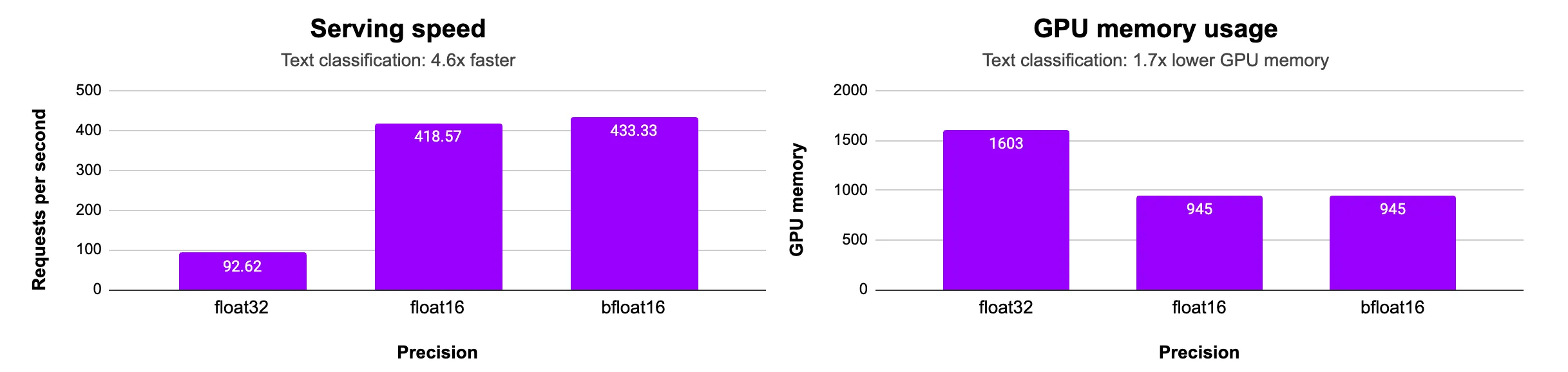
We observe that half-precision (16-bit) uses 1.7x less GPU memory and delivers faster throughput compared to float32 precision.
8-bit with Lightning Fabric
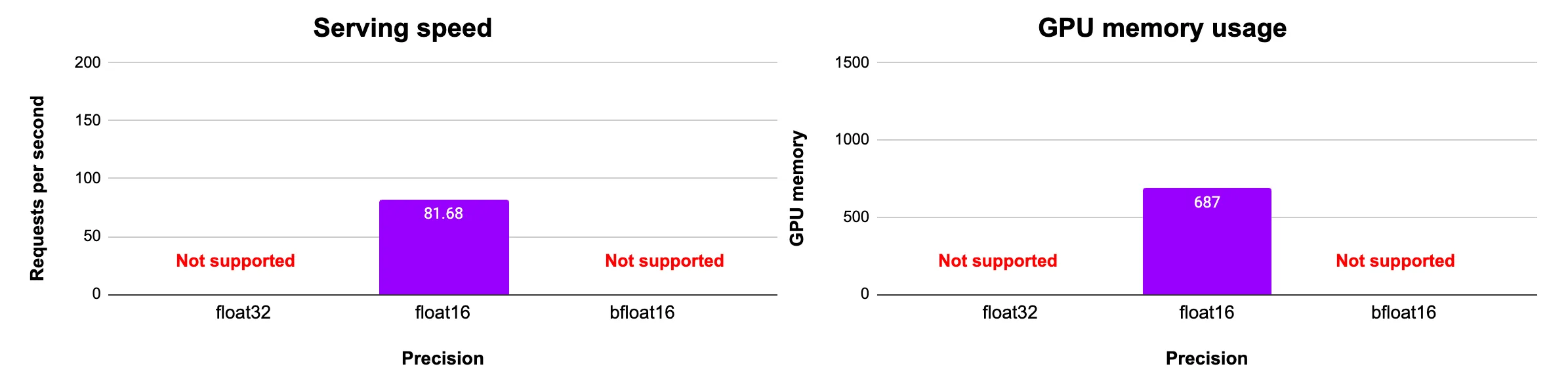
Lightning Fabric supports 8-bit quantization with the Bitsandbytes plugin. We use this to serve the BERT-Large model and achieve a 2.3x reduction in GPU memory as compared to 32-bit precision.
from transformers import AutoModelForSequenceClassification, AutoTokenizer
from lightning.fabric.plugins import BitsandbytesPrecision
import torch
import lightning as L
import litserve as ls

class HuggingFaceLitAPI(ls.LitAPI):
    def setup(self, device):
        self.precision = torch.float16
        plugin = BitsandbytesPrecision(mode="int8")
        self.fabric = L.Fabric(accelerator="cuda", plugins=plugin)
        model_name = "google-bert/bert-large-uncased"
        self.tokenizer = AutoTokenizer.from_pretrained(model_name)
        self.model = AutoModelForSequenceClassification.from_pretrained(model_name).to(self.precision)
        self.model = self.fabric.setup_module(self.model)

    def decode_request(self, request:dict):
        return request["text"]

    def batch(self, inputs):
        return self.tokenizer(inputs, return_tensors="pt", padding=True, truncation=True)

    def predict(self, inputs):
        inputs = {key: value.to(self.device) for key, value in inputs.items()}
        with torch.inference_mode():
            outputs = self.model(**inputs)
            logits = outputs.logits
            predicted_class_ids = torch.argmax(logits, dim=1)
        return predicted_class_ids

    def unbatch(self, outputs):
        return outputs.tolist()

    def encode_response(self, output):
        return {"label_idx": output}

if __name__ == "__main__":
    api = HuggingFaceLitAPI(max_batch_size=10, batch_timeout=0.01)
    server = ls.LitServer(api)
    server.run(port=8000)
Please note that while model weights are quantized to 8-bit, computations are still performed in full or half precision.
4-bit with Lightning Fabric
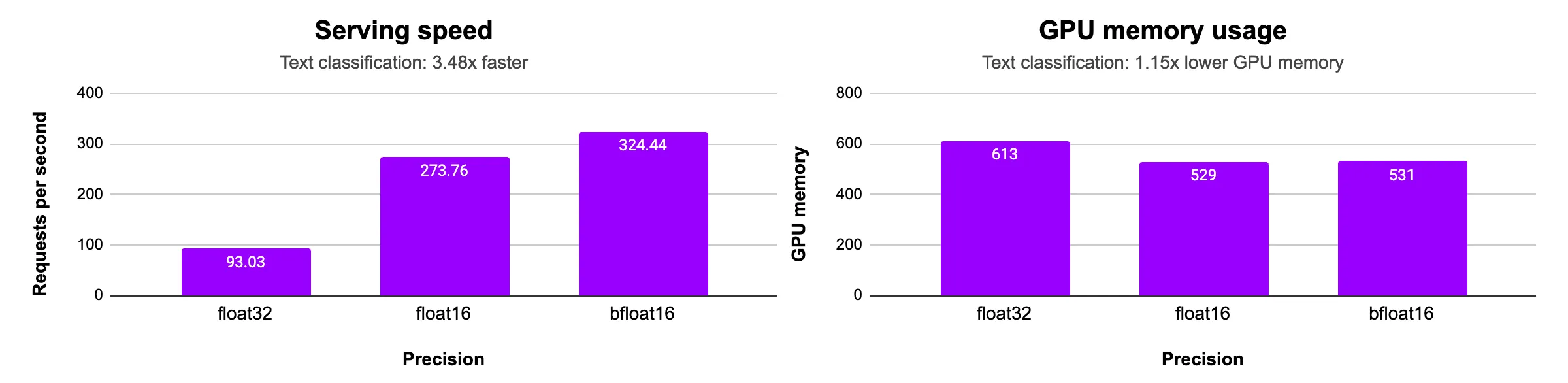
Lightning Fabric supports 4-bit quantization with the Bitsandbytes plugin. We use this to serve the BERT-Large model and achieve a 3x reduction in GPU memory.
from transformers import AutoModelForSequenceClassification, AutoTokenizer
from lightning.fabric.plugins import BitsandbytesPrecision
import torch
import lightning as L
import litserve as ls

class HuggingFaceLitAPI(ls.LitAPI):
    def setup(self, device):
        self.precision = torch.bfloat16
        plugin = BitsandbytesPrecision(mode="fp4")
        self.fabric = L.Fabric(accelerator="cuda", plugins=plugin)
        model_name = "google-bert/bert-large-uncased"
        self.tokenizer = AutoTokenizer.from_pretrained(model_name)
        self.model = AutoModelForSequenceClassification.from_pretrained(model_name).to(self.precision)
        self.model = self.fabric.setup_module(self.model)

    def decode_request(self, request:dict):
        return request["text"]

    def batch(self, inputs):
        return self.tokenizer(inputs, return_tensors="pt", padding=True, truncation=True)

    def predict(self, inputs):
        inputs = {key: value.to(self.device) for key, value in inputs.items()}
        with torch.inference_mode():
            outputs = self.model(**inputs)
            logits = outputs.logits
            predicted_class_ids = torch.argmax(logits, dim=1)
        return predicted_class_ids

    def unbatch(self, outputs):
        return outputs.tolist()

    def encode_response(self, output):
        return {"label_idx": output}

if __name__ == "__main__":
    api = HuggingFaceLitAPI(max_batch_size=10, batch_timeout=0.01)
    server = ls.LitServer(api)
    server.run(port=8000)
Please note that while model weights are quantized to 8-bit, computations are still performed in full or half precision.
Conclusion
Half precision (float16 or bfloat16) and quantization can significantly reduce GPU memory usage and increase computational speed. Additionally, server performance can be further improved by optimizing the model using compilers like torch.compile or Lightning Thunder.
Was this page helpful?
Thanks for the feedback.