
Multi-node
Lightning AI offers multiple ways of doing multi-node training. Multi-node allows you to run on more GPUs than can fit in a single machine. The main ways of running multi-node on Lightning AI are to run fully on-demand or on a cluster.
Read this guide to understand instant multi-node or watch this tutorial.
Submit a job
On Lightning AI you don't need a cluster to run multi-node. You can fully run on-demand without a reservation. In this mode, the cluster is brought up for the training run and shut down immediately after. This means you only pay for what you use by the second and don't need a reserved cluster.
When you submit an on-demand multi-node job, Lightning AI takes care of finding collocated nodes, with high-performance networking and a high-performance storage disk attached. However, performance varies cloud to cloud, depending on things like infiniband availability, Vast storage, etc...
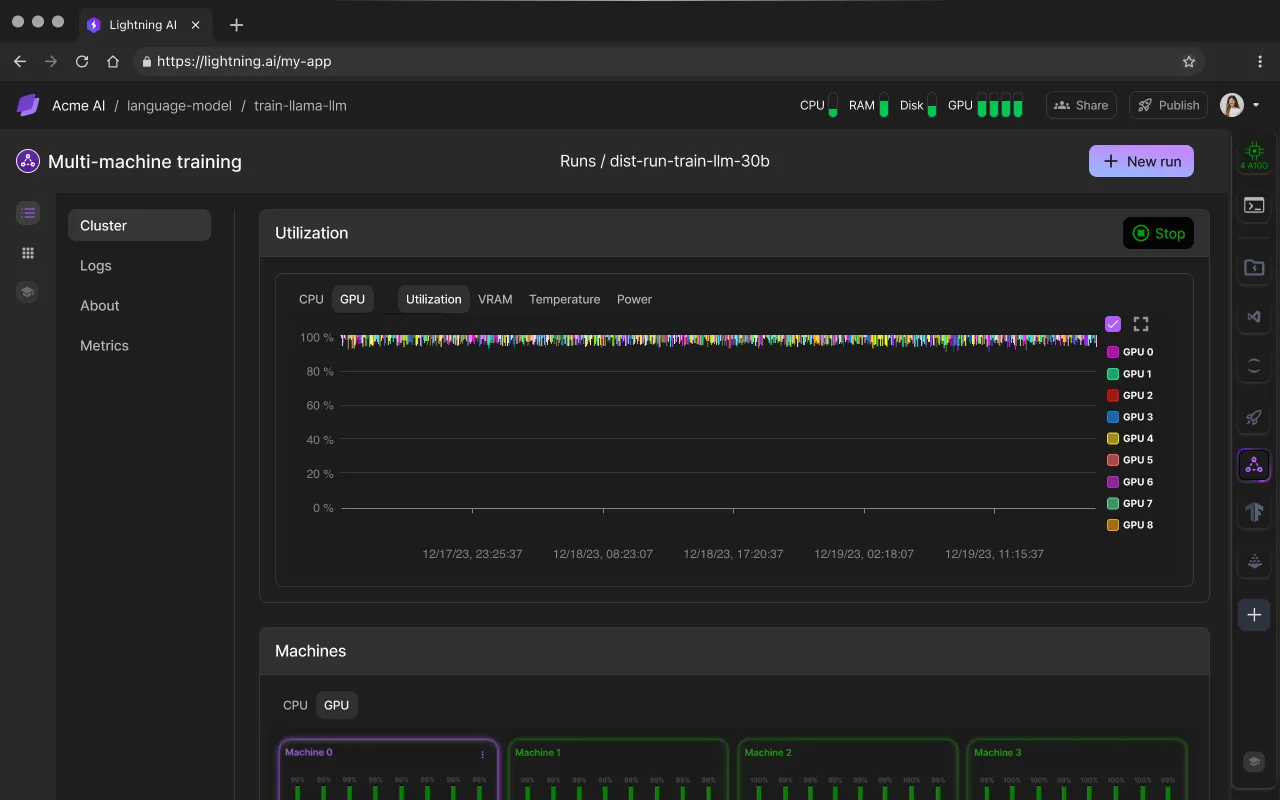
From the UI
To submit an on-demand multi-node run, open the plugins panel and install the multi-machine training plugin. The plugin will allow you to submit multi-node jobs from the Studio.
Install the multi-machine training plugin.
If you’ve never done multi-node training, this will feel like you have superpowers. And if you have done it before in your company or research lab, you will know how time consuming it can be to set things up correctly on your own.
This is how you do multi-node on Lightning Studios!
Depending on your code base, there are currently two ways to do multi-node:
- PyTorch Lightning Fabric or Trainer: No code changes are required
- Raw PyTorch script: A few code changes are required
Support for TensorFlow and other deep learning frameworks is coming soon. Please reach out if you have interest in these!
The multi-node plugin forks the Studio into each different machine on the cluster. This guarantees that the code, data and environment are the same on each different machine.
The multi-node plugin forks a Studio, and duplicates all data, environment, and files across all machines.
SDK
Submit a multi-machine training (MMT) job via the SDK:
from lightning_sdk import Studio, Machine, MMT

studio = Studio(name='my-studio', teamspace='my-teamspace', user='my-user')

# Define the command to run and submit the job
submitted_job = MMT.run(command="echo Hello, Lightning!", name="echo-example", machine=Machine.CPU, studio=studio, num_machines=2)

print(f"Job submitted: {submitted_job}")
CLI
To run multi-node via the CLI, use lightning mmt run instead of lightning job run like so:
lightning mmt run \
  --image="my-image:latest" \
  --machine=T4 \
  --num-machines=4 \
  --command="python /train.py" \
  --teamspace=my-teamspace \
  --org=my-org
For additional information on submitting an MMT job from the CLI, run
lightning mmt run --helpSupported ML frameworks
Lightning Studios can run any ML framework in multi-node such as PyTorch, JAX and TensorFlow.
PyTorch Lightning
If your script uses the PyTorch Lightning Trainer, your code is already compatible and optimized for multi-GPU and multi-node training. No code changes required!
Here is an example code if you want to try it out right now. But it's more fun if you bring your own code into the Studio:
import lightning as L
import torch
import torch.nn.functional as F
from lightning.pytorch.demos import Transformer, WikiText2
from torch.utils.data import DataLoader, random_split


class LanguageDataModule(L.LightningDataModule):
    def __init__(self, batch_size):
        super().__init__()
        self.batch_size = batch_size
        self.vocab_size = 33278

    def prepare_data(self):
        WikiText2(download=True)

    def setup(self, stage):
        dataset = WikiText2()

        # Split data in to train, val, test
        n = len(dataset)
        self.train_dataset, self.val_dataset, self.test_dataset = random_split(dataset, [n - 4000, 2000, 2000])

    def train_dataloader(self):
        return DataLoader(self.train_dataset, batch_size=self.batch_size, shuffle=True)

    def val_dataloader(self):
        return DataLoader(self.val_dataset, batch_size=self.batch_size, shuffle=False)

    def test_dataloader(self):
        return DataLoader(self.test_dataset, batch_size=self.batch_size, shuffle=False)


class LanguageModel(L.LightningModule):
    def __init__(self, vocab_size):
        super().__init__()
        self.vocab_size = vocab_size

    def setup(self, stage):
        self.model = Transformer(vocab_size=self.vocab_size)

    def training_step(self, batch, batch_idx):
        input, target = batch
        output = self.model(input, target)
        loss = F.nll_loss(output, target.view(-1))
        self.log("train_loss", loss)
        return loss

    def validation_step(self, batch, batch_idx):
        input, target = batch
        output = self.model(input, target)
        loss = F.nll_loss(output, target.view(-1))
        self.log("val_loss", loss)
        return loss

    def test_step(self, batch, batch_idx):
        input, target = batch
        output = self.model(input, target)
        loss = F.nll_loss(output, target.view(-1))
        self.log("test_loss", loss)
        return loss

    def configure_optimizers(self):
        return torch.optim.SGD(self.parameters(), lr=0.1)


def main():
    L.seed_everything(42)

    datamodule = LanguageDataModule(batch_size=20)

    model = LanguageModel(datamodule.vocab_size)

    # Trainer
    trainer = L.Trainer(gradient_clip_val=0.25, max_epochs=2, strategy="ddp")
    trainer.fit(model, datamodule=datamodule)
    trainer.save_checkpoint("ptl_ddp.ckpt")

    trainer.test(model, datamodule=datamodule)


if __name__ == "__main__":
    main()
Follow this simple checklist to successfully launch a multi-node job:
Step 1: Remove hardcoded accelerator settings (if any) and let Lightning AI automatically set them for you.
# These are the defaults
trainer = Trainer(accelerator="auto", devices="auto")

# DON'T hardcode these, leave them default/auto
# trainer = Trainer(accelerator="cpu", devices=3)
Step 2: Install dependencies and download all necessary data. Test that your script runs in the Studio first. If it runs in the Studio, it will run in multi-node.
Step 3: Open the Multi-Machine Training (MMT) app. Type the command to run your script, select the machine type, and specify how many machines you want to launch it on. Click "Run" to start the job.
After submitting the job, you will be redirected to a page where you can monitor the machine metrics and logs in real-time.
Lightning Fabric
If your script uses the Lightning Fabric, your code is already compatible and optimized for multi-GPU and multi-node training. No code changes required!
Here is an example code if you want to try it out right now. But it's more fun if you bring your own code into the Studio.
import lightning as L
import torch
import torch.nn.functional as F
from lightning.pytorch.demos import Transformer, WikiText2
from torch.utils.data import DataLoader


def main():
    L.seed_everything(42)

    fabric = L.Fabric()
    fabric.launch()

    # Data
    with fabric.rank_zero_first():
        dataset = WikiText2()

    train_dataloader = DataLoader(dataset, batch_size=20, shuffle=True)

    # Model
    model = Transformer(vocab_size=dataset.vocab_size)

    # Optimizer
    optimizer = torch.optim.SGD(model.parameters(), lr=0.1)

    model, optimizer = fabric.setup(model, optimizer)
    train_dataloader = fabric.setup_dataloaders(train_dataloader)

    for batch_idx, batch in enumerate(train_dataloader):
        input, target = batch
        output = model(input, target)
        loss = F.nll_loss(output, target.view(-1))
        fabric.backward(loss)
        optimizer.step()
        optimizer.zero_grad()

        if batch_idx % 10 == 0:
            fabric.print(f"iteration: {batch_idx} - loss {loss.item():.4f}")


if __name__ == "__main__":
    main()
Plain PyTorch
With a raw PyTorch script, you will have to add a few lines of code to make your code distributed. In essence, this involves parsing the environment variables provided by the multi-machine cluster
MASTER_ADDRMASTER_PORTNODE_RANKLOCAL_RANKWORLD_SIZE
and using them to initialize the PyTorch distributed backend. A bit of extra boilerplate code is needed to make the code run additionally on CPU and single-node for testing and debugging convenience.
Step 1: Refactor your script into this structure:
import torch.distributed as dist
from torch.nn.parallel import DistributedDataParallel as DDP
import torch.multiprocessing as mp
from torch.utils.data.distributed import DistributedSampler

# Your remaining imports here


def main():
    # Your training code here


def setup():
    # Setup will go here

    main()


if __name__ == "__main__":
    setup()
Step 2: In the setup() function, parse the environment variables:
def setup():
    if "MASTER_ADDR" not in os.environ:
        os.environ["MASTER_ADDR"] = "127.0.0.1"
        os.environ["MASTER_PORT"] = "6006"

    device = "cuda" if torch.cuda.is_available() else "cpu"
    nprocs = torch.cuda.device_count() if device == "cuda" else 1

    global_rank = int(os.environ.get("RANK", -1))
    local_rank = int(os.environ.get("LOCAL_RANK", -1))
    world_size = int(os.environ.get("WORLD_SIZE", nprocs))

    if global_rank == -1:
        mp.spawn(main, args=(global_rank, world_size, device), nprocs=nprocs)
    else:
        main(local_rank, global_rank, world_size, device)
Step 3: At the top of the main function, initialize the distributed backend:
def main(local_rank, global_rank, world_size, device):

    backend = "nccl" if device == "cuda" else "gloo"
    if global_rank == -1:
        global_rank = local_rank

    dist.init_process_group(backend=backend, rank=global_rank, world_size=world_size)
    device_id = local_rank

    # Rest of the code here (next step)
Step 4: The next few steps depend a bit on your implementation. First, make sure you configure a distributed sampler in your dataloader:
train_dataloader = DataLoader(..., sampler=DistributedSampler(train_dataset))Step 5: Set up DDP on your model:
model = ...
if device == "cuda":
    model.to(device_id)

device_ids = [device_id] if device == "cuda" else None
ddp_model = DDP(model, device_ids=device_ids)
Step 6: Modify your training loop:
for epoch in range(num_epochs):

    # 1) set the epoch on sampler (to rotate the seeding)
    train_dataloader.sampler.set_epoch(epoch)

    for it, batch in enumerate(train_dataloader):

        # 2) Move data to the correct device
        input, target = batch
        if device == "cuda":
            input = input.to(device_id)
            target = target.to(device_id)

            optimizer.zero_grad()

        # 3) Use the 'ddp_model' instead 'model'
        output = ddp_model(input, target)

        loss = F.nll_loss(output, target.view(-1))

        # 4) Print things on rank 0 to avoid duplicated logs
        if global_rank == 0:
            print(f"epoch/it: {epoch}/{it}, train_loss {float(loss)}")

        loss.backward()
        optimizer.step()
Here is the full script converted to be compatible with PyTorch distributed. It is ready to run in multi-node!
import os

import torch
import torch.distributed as dist
import torch.nn.functional as F
from torch.utils.data import DataLoader, random_split
from torch.nn.parallel import DistributedDataParallel as DDP
import torch.multiprocessing as mp
from torch.utils.data.distributed import DistributedSampler

from lightning.pytorch.demos import Transformer, WikiText2


def main(local_rank, global_rank, world_size, device):
    torch.manual_seed(42)

    backend = "nccl" if device == "cuda" else "gloo"
    if global_rank == -1:
        global_rank = local_rank

    dist.init_process_group(backend=backend, rank=global_rank, world_size=world_size)

    device_id = local_rank

    if local_rank == 0:
        WikiText2(download=True)

    dist.barrier()

    dataset = WikiText2(download=False)

    n = len(dataset)
    train_dataset, val_dataset, test_dataset = random_split(dataset, [n - 4000, 2000, 2000])
    train_dataloader = DataLoader(
        train_dataset,
        batch_size=20,
        shuffle=False,
        sampler=DistributedSampler(train_dataset)
    )

    model = Transformer(vocab_size=dataset.vocab_size)
    if device == "cuda":
        model.to(device_id)

    device_ids = [device_id] if device == "cuda" else None
    ddp_model = DDP(model, device_ids=device_ids)

    optimizer = torch.optim.SGD(ddp_model.parameters(), lr=0.1)

    model.train()
    num_epochs = 2
    for epoch in range(num_epochs):
        train_dataloader.sampler.set_epoch(epoch)
        for it, batch in enumerate(train_dataloader):
            input, target = batch
            if device == "cuda":
                input = input.to(device_id)
                target = target.to(device_id)
            optimizer.zero_grad()
            output = ddp_model(input, target)
            loss = F.nll_loss(output, target.view(-1))
            if global_rank == 0:
                print(f"epoch/it: {epoch}/{it}, train_loss {float(loss)}")
            loss.backward()
            optimizer.step()

    if global_rank == 0:
        state = {
            'model': ddp_model.module.state_dict(),
        }
        torch.save(state, "pytorch_ddp.ckpt")

    dist.barrier()
    dist.destroy_process_group()


if __name__ == "__main__":
    if "MASTER_ADDR" not in os.environ:
        os.environ["MASTER_ADDR"] = "127.0.0.1"
        os.environ["MASTER_PORT"] = "6006"

    device = "cuda" if torch.cuda.is_available() else "cpu"
    nprocs = torch.cuda.device_count() if device == "cuda" else 1

    global_rank = int(os.environ.get("RANK", -1))
    local_rank = int(os.environ.get("LOCAL_RANK", -1))
    world_size = int(os.environ.get("WORLD_SIZE", nprocs))

    if global_rank == -1:
        mp.spawn(main, args=(global_rank, world_size, device), nprocs=nprocs)
    else:
        main(local_rank, global_rank, world_size, device)
If this amount of preparation feels overwhelming, you are not alone. We created PyTorch Lightning to get rid of all this distributed, error-prone boilerplate code. Consider converting your code to PyTorch Lightning so you can switch from CPU, to multi-GPU, to multi-node seamlessly without code changes.
Hugging Face and others
PyTorch Lightning and Lightning Fabric are designed to work well with Hugging Face and other frameworks for pretraining or finetuning any model in a single GPU or multi-node setting. Simply replace the Hugging Face Trainer with the Lightning Trainer.
Did you know that the Lightning Trainer was introduced in 2019? 2 full years before the Hugging Face Trainer. Lightning's Trainer set the standard that's become adopted industry-wide now.
TensorFlow
With TensorFlow, you will have to add a few lines of code to make your code distributed. In essence, this involves parsing the environment variables provided by the multi-machine cluster
MASTER_ADDRMASTER_PORTNODE_RANKLOCAL_RANKWORLD_SIZE
import os
import tensorflow as tf

# Environment variables setup for distributed training
os.environ['TF_CONFIG'] = json.dumps({
    'cluster': {
        'worker': [f"{os.getenv('MASTER_ADDR')}:{os.getenv('MASTER_PORT')}" for _ in range(int(os.getenv('WORLD_SIZE')))]
    },
    'task': {'type': 'worker', 'index': int(os.getenv('RANK'))}
})

# Setting up the strategy for multi-worker training
strategy = tf.distribute.MultiWorkerMirroredStrategy()

# Example of model building and training inside the strategy scope
with strategy.scope():
    # Model definition
    model = tf.keras.Sequential([
        tf.keras.layers.Dense(10, activation='relu', input_shape=(20,)),
        tf.keras.layers.Dense(1)
    ])

    # Compile the model
    model.compile(optimizer='adam',
                  loss='mse')

    # Example dataset
    import numpy as np
    x = np.random.random((100, 20))
    y = np.random.random((100, 1))

    # Train the model
    model.fit(x, y, epochs=10, batch_size=5)
Optimize training speed
The biggest bottleneck to fast multi-node training is always data loading speed. Lightning AI solves this across various verticals.
Networking speed
When you submit an on-demand multi-node job, Lightning AI takes care of finding collocated nodes, with high-performance networking and a high-performance storage disk attached.
Networking speed will highly depend on which cloud you run on. We also look for clouds that have Infiniband and run extensive benchmarking tests. However, certain clouds don't offer high-performance networking. If you run multi-node in these clouds, temper your performance expectations.
Maximize GPU utilization
The Lightning AI platform will fully set up the nodes with the right environment variables, disk, networking, etc... However, the performance from that point forward depends on your particular training script.
Make sure your code is optimized to take advantage of the GPU memory and saturate it. This is generally not something that can be automated and must be hand-tuned and hand-crafted by experts. You can use the AI copilot to help you do this on a Studio which will get you pretty far.
For human-tuned performance, Lightning AI offers professional services that can help improve your data loading speeds.
Please get in touch at [email protected].
Hand-tune batch sizes to take advantage of the GPU memory and saturate it.
Data preparation
It is very likely that your data will become a bottleneck at this scale. We recommend to optimize your dataset for fast streaming and loading into all the machines. Lightning AI has a native library for this called LitData. Follow the data optimization guide for more information.
Example: Pretrain a 1B LLM
If you want to try multi-node on a realistic use case, we have a LLM pretraining Studio ready to go for multi-node: Pretrain LLMs - TinyLlama 1.1B. For example, on a single machine (8 × A100), this training would take several months, but on 8 machines (64 × A100), it takes less than 4 weeks to finish training.
Was this page helpful?
Thanks for the feedback.