
Logging and monitoring
Logging is essential for monitoring and optimizing machine learning systems, as it involves tracking metrics like inference speed and predictions. LitServe allows to efficiently capture these metrics without adding latency to the server.
Background
Monitoring ML APIs
Monitoring machine learning APIs is crucial to ensure they perform well and deliver reliable results. Tracking key metrics like prediction times and memory usage improves the system and provides a better experience for users.
Metrics vizualization
Visualizing these metrics helps in understanding the system's performance at a glance. Tools like dashboards and graphs make it easy to spot trends and identify areas for improvement.
Logging metrics with LitServe
LitServe makes tracking important metrics easy and efficient. It logs metrics as key-value pairs into a queue using the LitAPI.log method. A Logger object then consumes this queue and processes the metrics through its process method. The Logger class defines how to handle these metrics, allowing for flexible and customized actions based on specific needs.
To log metrics with LitServe:
- Record metrics by using the
LitAPI.logmethod to log key-value pairs. - Define how to process the metrics by implementing a custom Logger class.
- Attach the logger to the LitServer to start processing the logged metrics.
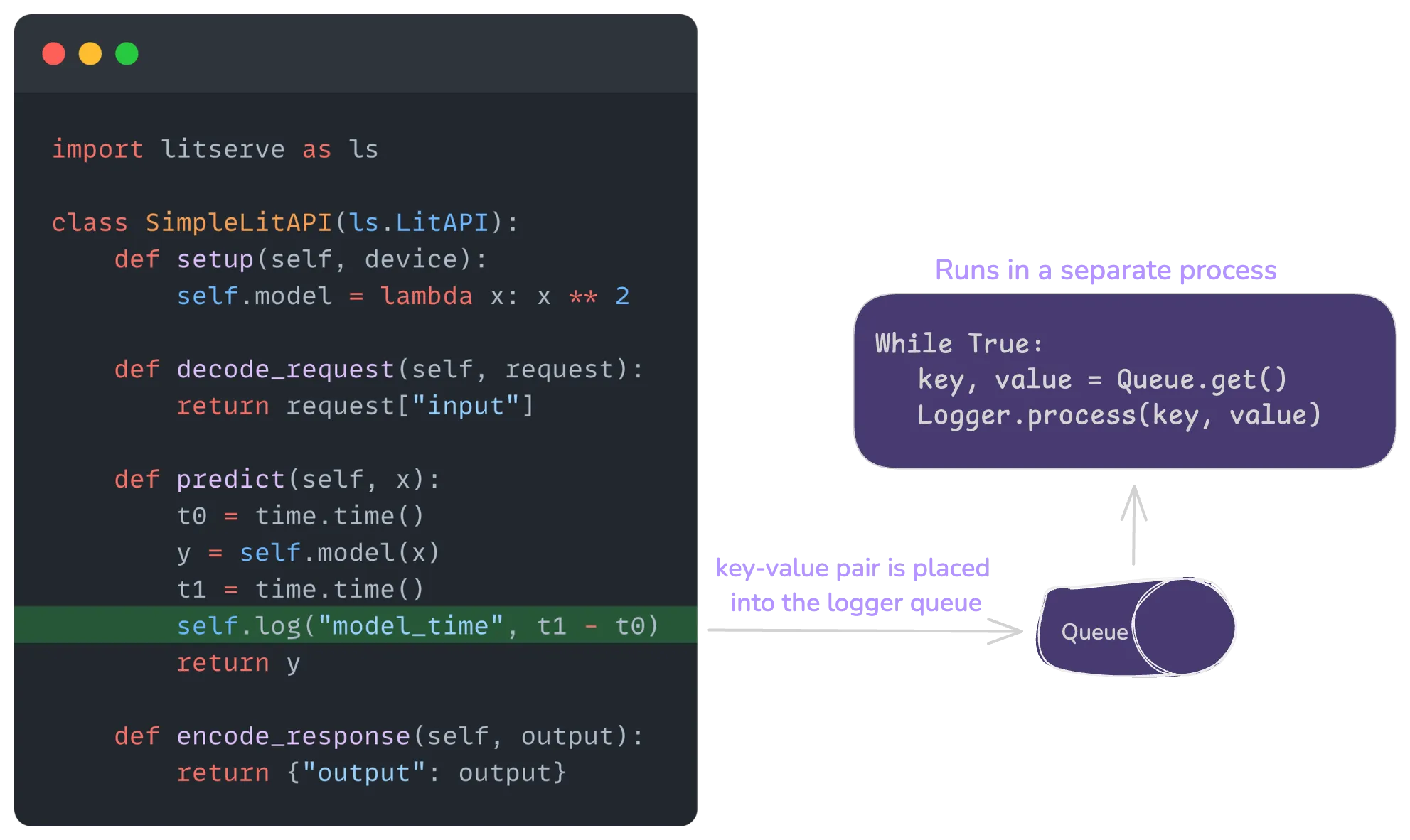
Here is a simple, complete example of logging model inference time in console. We explain the code in the following section:
import time
import litserve as ls

class SimpleLitAPI(ls.LitAPI):
    def setup(self, device):
        self.model = lambda x: x ** 2

    def decode_request(self, request):
        return request["input"]

    def predict(self, x):
        t0 = time.time()
        y = self.model(x)
        t1 = time.time()
        self.log("model_time", t1 - t0)
        return y

    def encode_response(self, output):
        return {"output": output}

class SimpleLogger(ls.Logger):
    def process(self, key, value):
        print(f"Received {key} with value {value}", flush=True)

if __name__ == '__main__':
    lit_api = SimpleLitAPI()
    server = ls.LitServer(lit_api, loggers=SimpleLogger())
    server.run()
Logger
LitServe provides a Logger class that ensures efficient metric tracking without impacting server performance by processing metrics in a separate process. It collects key-value metrics from a queue called logger_queue and handles them using the Logger.process method.
For example, a logger can print metrics to the console, or they can be stored in a database or sent to monitoring tools like Grafana or Prometheus. The following example implements a Logger that prints the metrics to console.
import litserve as ls

class SimpleLogger(ls.Logger):
    def process(self, key, value):
        print(f"Received {key} with value {value}", flush=True)
Integrate a logger
To attach a logger to LitServe, set the loggers argument of LitServer to the logger object.
In the following example, the SimpleLitAPI class logs the model inference time by calling self.log("model_time", t1 - t0) within the predict method. The SimpleLogger class processes these logs and prints the key-value pairs to the console.
By providing the SimpleLogger instance to the loggers argument when initializing LitServer, the logger is attached and starts processing the logged metrics in a separate process.
import time
import litserve as ls

class SimpleLitAPI(ls.LitAPI):
    def setup(self, device):
        self.model = lambda x: x ** 2

    def decode_request(self, request):
        return request["input"]

    def predict(self, x):
        t0 = time.time()
        y = self.model(x)
        t1 = time.time()
        self.log("model_time", t1 - t0)
        return y

    def encode_response(self, output):
        return {"output": output}

class SimpleLogger(ls.Logger):
    def process(self, key, value):
        print(f"Received {key} with value {value}", flush=True)

if __name__ == '__main__':
    lit_api = SimpleLitAPI()
    server = ls.LitServer(lit_api, loggers=SimpleLogger())
    server.run()
Multiple loggers
LitServe supports multiple loggers, and each logged metric is passed to all of them. To attach multiple loggers, provide the loggers argument of LitServer with a list of Logger objects.
The following example adds two loggers to the API:
import time
import litserve as ls

class SimpleLitAPI(ls.LitAPI):
    def setup(self, device):
        self.model = lambda x: x ** 2

    def decode_request(self, request):
        return request["input"]

    def predict(self, x):
        t0 = time.time()
        y = self.model(x)
        t1 = time.time()
        self.log("model_time", t1 - t0)
        return y

    def encode_response(self, output):
        return {"output": output}

class SimpleLogger(ls.Logger):
    def process(self, key, value):
        print(f"Received {key} with value {value}", flush=True)

class FileLogger(ls.Logger):
    def process(self, key, value):
        with open("test_logger_temp.txt", "a+") as f:
            f.write(f"{key}: {value:.1f}\n")

if __name__ == '__main__':
    lit_api = SimpleLitAPI()
    server = ls.LitServer(lit_api, loggers=[SimpleLogger(), FileLogger()])
    server.run()
In this example:
SimpleLoggerprints the received metrics to the console.FileLoggerwrites the metrics to a file.- Both loggers are attached to the LitServer by passing them as a list to the loggers argument.
- Each logged metric from
SimpleLitAPIis processed by both loggers independently.
Logging with callback
LitServe callback is a way to inject custom behavior into the server lifecycle at various stages, such as at the start or end of setup, predict, etc. Callbacks can also log metrics by accessing the LitAPI.log method.
The following example uses a callback to calculate the model inference time and logs the metric by using lit_api.log method:
import time
import litserve as ls

class SimpleLitAPI(ls.LitAPI):
    def setup(self, device):
        self.model = lambda x: x ** 2

    def decode_request(self, request):
        return request["input"]

    def predict(self, x):
        return self.model(x)

    def encode_response(self, output):
        return {"output": output}

class SimpleLogger(ls.Logger):
    def process(self, key, value):
        print(f"Received {key} with value {value}", flush=True)

class PredictionTimeLogger(ls.Callback):
    def on_before_predict(self, lit_api):
        t0 = time.perf_counter()
        self._start_time = t0

    def on_after_predict(self, lit_api):
        t1 = time.perf_counter()
        elapsed = t1 - self._start_time
        lit_api.log("prediction_time", elapsed)

if __name__ == '__main__':
    lit_api = SimpleLitAPI()
    server = ls.LitServer(lit_api, callbacks=[PredictionTimeLogger()], loggers=SimpleLogger())
    server.run()
Examples
Prometheus
Prometheus is an open-source systems monitoring and alerting toolkit. It can be integrated with LitServe using its Python client.
The following example implements a Prometheus logger that processes the logged key and value with the Histogram metric type.
import os, time
from prometheus_client import CollectorRegistry, Histogram, make_asgi_app, multiprocess
import litserve as ls

# Set the directory for multiprocess mode
os.environ["PROMETHEUS_MULTIPROC_DIR"] = "/tmp/prometheus_multiproc_dir"

# Ensure the directory exists
if not os.path.exists("/tmp/prometheus_multiproc_dir"):
    os.makedirs("/tmp/prometheus_multiproc_dir")

# Use a multiprocess registry
registry = CollectorRegistry()
multiprocess.MultiProcessCollector(registry)


class PrometheusLogger(ls.Logger):
    def __init__(self):
        super().__init__()
        self.function_duration = Histogram("request_processing_seconds", "Time spent processing request", ["function_name"], registry=registry)

    def process(self, key, value):
        print("processing", key, value)
        self.function_duration.labels(function_name=key).observe(value)

class SimpleLitAPI(ls.LitAPI):
    def setup(self, device):
        self.model1 = lambda x: x**2
        self.model2 = lambda x: x**3

    def decode_request(self, request):
        return request["input"]

    def predict(self, x):
        start_time = time.perf_counter()
        squared = self.model1(x)
        cubed = self.model2(x)
        output = squared + cubed
        self.log("inference_time", time.perf_counter() - start_time)
        return {"output": output}

    def encode_response(self, output):
        return {"output": output}


if __name__ == "__main__":
    prometheus_logger = PrometheusLogger()
    prometheus_logger.mount(path="/metrics", app=make_asgi_app(registry=registry))
    api = SimpleLitAPI()
    server = ls.LitServer(api, loggers=prometheus_logger)
    server.run(port=8000)
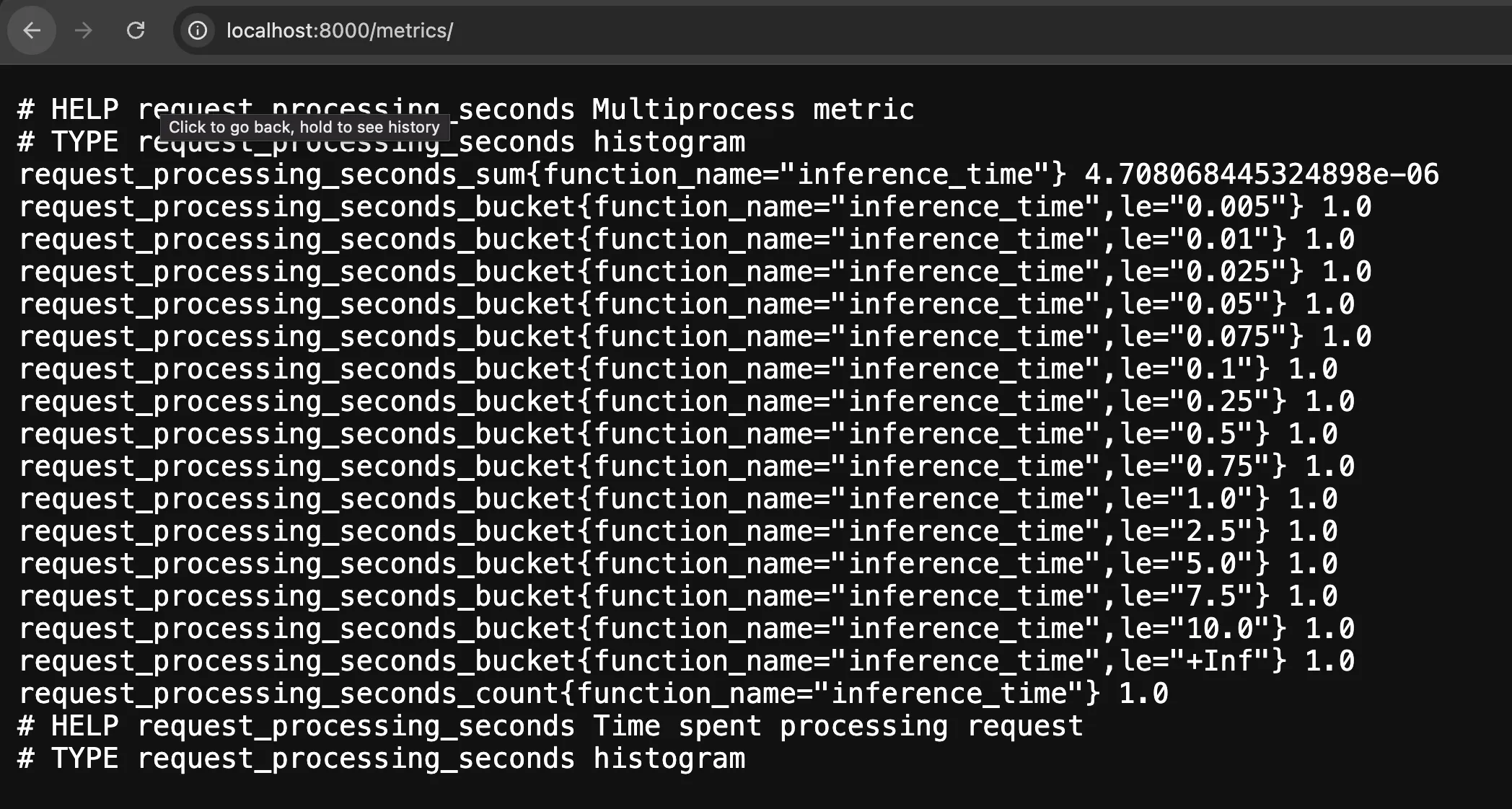
Prometheus metrics can be accessed at /metrics endpoint. The output would like the following:
Conclusion
Using the LitServe Logger allows effective monitoring of machine learning applications without impacting performance. It ensures the service runs smoothly and provides valuable insights for optimization.
Was this page helpful?
Thanks for the feedback.