
Sandbox
Running untrusted code, agent output, or one-off scripts carries real risk — wrong environment, leaked credentials, broken production. Lightning AI Sandbox gives every workload its own isolated Linux environment, spun up in milliseconds and torn down when you're done.
Use cases
- Run LLM-generated code safely: Execute code produced by a language model without exposing your systems. If it breaks, the sandbox absorbs it.
- Isolate untrusted code: Run user uploads, third-party scripts, or agent output in a fully contained environment with its own filesystem and network.
- Check out and test repositories: Clone a git repo and run commands against it (test suites,
npm lint, builds) without touching your local setup. - Spin up containers with custom dependencies: Install packages, run setup scripts, or bring your own OCI image. Every sandbox has full
sudoaccess. - Build interactive developer tools: Power code playgrounds, AI-driven UI builders, or live preview environments.
- Run development servers: Start a server inside a sandbox and access it with a live preview URL.
Features
- Isolation: Every sandbox runs in a strongly isolated environment, keeping its filesystem, network, and processes separate from everything else, so untrusted code can't reach production.
- Node.js and Python runtimes: Choose from
node24,node22, orpython313, each with full root access. Install any package or binary you need. - System-privileged processes: Run processes that require elevated permissions, with
sudoaccess available in every sandbox. - Fast startup: Sandboxes start in milliseconds, making them ideal for real-time user interactions and latency-sensitive workloads.
- Persistent sandboxes: Sandboxes auto-save state on stop and resume right where you left off.
- Snapshotting: Save the state of a running sandbox to resume later, and skip dependency installation on subsequent runs.
- CLI and SDKs: Manage sandboxes through the CLI, JS SDK, or Python SDK, and automate sandbox workflows in your application.
Choose your interface
Use the Sandbox SDKs to integrate Lightning AI Sandbox into your applications. They provide a programmatic interface to create sandboxes, run commands, and manage files.
Pick the interface that matches your stack, then use the matching quick start below:
- Python SDK Reference: Use
Sandboxfrom thelightning-sdkPython package - JS SDK Reference: Use
@lightningai/sdkfor JavaScript and TypeScript - CLI Reference: Use the
lightning sandboxCLI for manual testing, agentic workflows, debugging, and one-off operations
Authentication
All three interfaces read the same credentials. Set a teamspace-scoped API key (recommended) before running any of the quick starts:
export LIGHTNING_SANDBOX_API_KEY="sk-lit-..."Get a teamspace-scoped API key
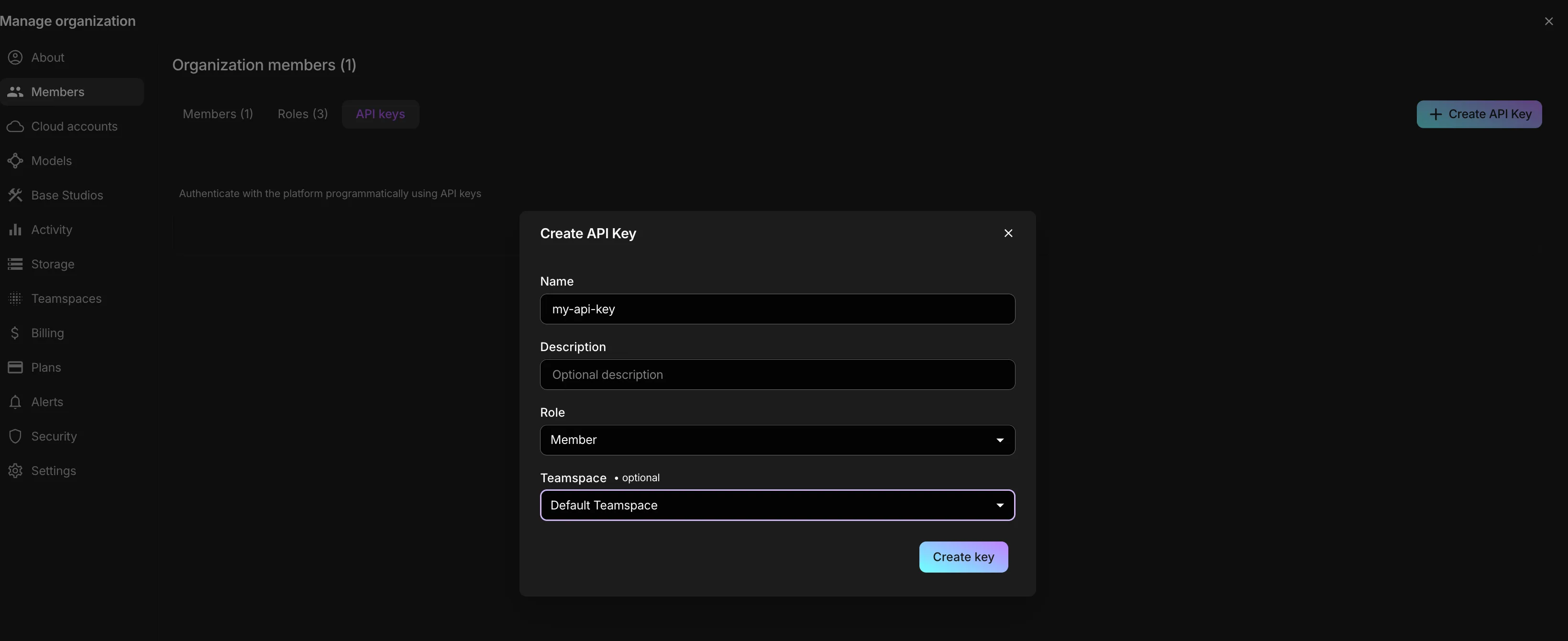
- Open your organization's settings and go to Members → API keys.
- Reuse an existing key by copying it, or click Create API Key to make a new one.
- In the Create API Key dialog, give the key a Name, an optional Description, pick a Role, and select the Teamspace to scope it to. Then click Create key.
- Copy the generated key and export it as
LIGHTNING_SANDBOX_API_KEYas shown above.
Quick start
Python SDK
Install the SDK (Python 3.10+):
pip install lightning-sdkCreate a sandbox, run a command, then delete it:
from lightning_sdk.sandbox import Sandbox

sandbox = Sandbox.create(name="quickstart", instance_type="cpu-1")

try:
    result = sandbox.run_command("echo", ["Hello, World!"])
    print(result.output.rstrip())  # Hello, World!
    print(result.exit_code)        # 0
finally:
    sandbox.delete()
For files, snapshots, PTY sessions, and the full API, see the Python SDK Reference.
JS SDK
Install the SDK (requires Node.js 22+):
npm install @lightningai/sdkCreate a sandbox, run a command, then delete it:
import { Sandbox } from "@lightningai/sdk";

const sandbox = await Sandbox.create({ name: "quickstart", instanceType: "cpu-1" });

try {
  const result = await sandbox.runCommand("echo", ["Hello, World!"]);
  console.log(result.output.trimEnd()); // Hello, World!
  console.log(result.exitCode);         // 0
} finally {
  await sandbox.delete();
}
The package is ESM-only. For files, snapshots, PTY sessions, and the full API, see the JS SDK Reference.
CLI
The CLI ships with the Lightning SDK:
pip install lightning-sdkCreate a sandbox, run a command, then delete it:
SBX=$(lightning sandbox create --runtime python313 --instance-type cpu-1 --json | jq -r .id)
lightning sandbox run "$SBX" -- python -c "print('Hello, World!')"
lightning sandbox delete "$SBX"
A synchronous run propagates the inner command's exit code, which makes the CLI
a drop-in for CI gating. For the full command list, scripting tips, and
snapshots, see the CLI Reference.
Examples
End-to-end walkthroughs of what you can build with a sandbox:
- Run arbitrary code in a sandboxed environment: Install multiple language runtimes into one sandbox, run bash, Python, Node.js, Ruby, and PHP, stream long-running output, and safely run dangerous code.
- Build a stateful, sandboxed code interpreter: Run a long-lived Python driver over a PTY session to build a stateful
exec()-based interpreter that keeps variables alive between snippets.
Runtimes
Sandboxes offer node24, node22, and python313 runtimes, or you can bring your
own OCI image. The default runtime is node24, and every sandbox has sudo access.
For detailed information about runtimes, see Runtimes.
Instance types
The instance type is the machine shape, chosen independently from the runtime. Pick the smallest slug that fits your workload.
| Slug | vCPU | RAM |
|---|---|---|
cpu-1 |
1 | 1 GB |
cpu-2 |
2 | 8 GB |
cpu-4 |
4 | 16 GB |
cpu-8 |
8 | 32 GB |
cpu-16 |
16 | 64 GB |
Was this page helpful?
Thanks for the feedback.