
Share private Studios
This guide explains how to share Studios with organization members, which allow others to jumpstart AI projects from internal Studio templates.
Share work across the organization
A way to share work across the organization is to publish Studios to the internal library.
Share work by publishing to your organization's Studio templates.
By publishing Studios, you create a repository of AI systems for internal use. This method enables creating and reusing individual components within your organization. For example, a data scientist's efficient data preparation method can be shared as a Studio. Other researchers can utilize this Studio, enhancing productivity with minimal additional costs.
Next, another researcher can find that Studio in the internal library, "Run" it, and instantly reap the benefits. One-time cost, nearly endless productivity gains for your organization.
People within your organization can easily find and duplicate Published templates.
One Studio per pipeline task
Consider structuring pipelines by dedicating a Studio to each task.
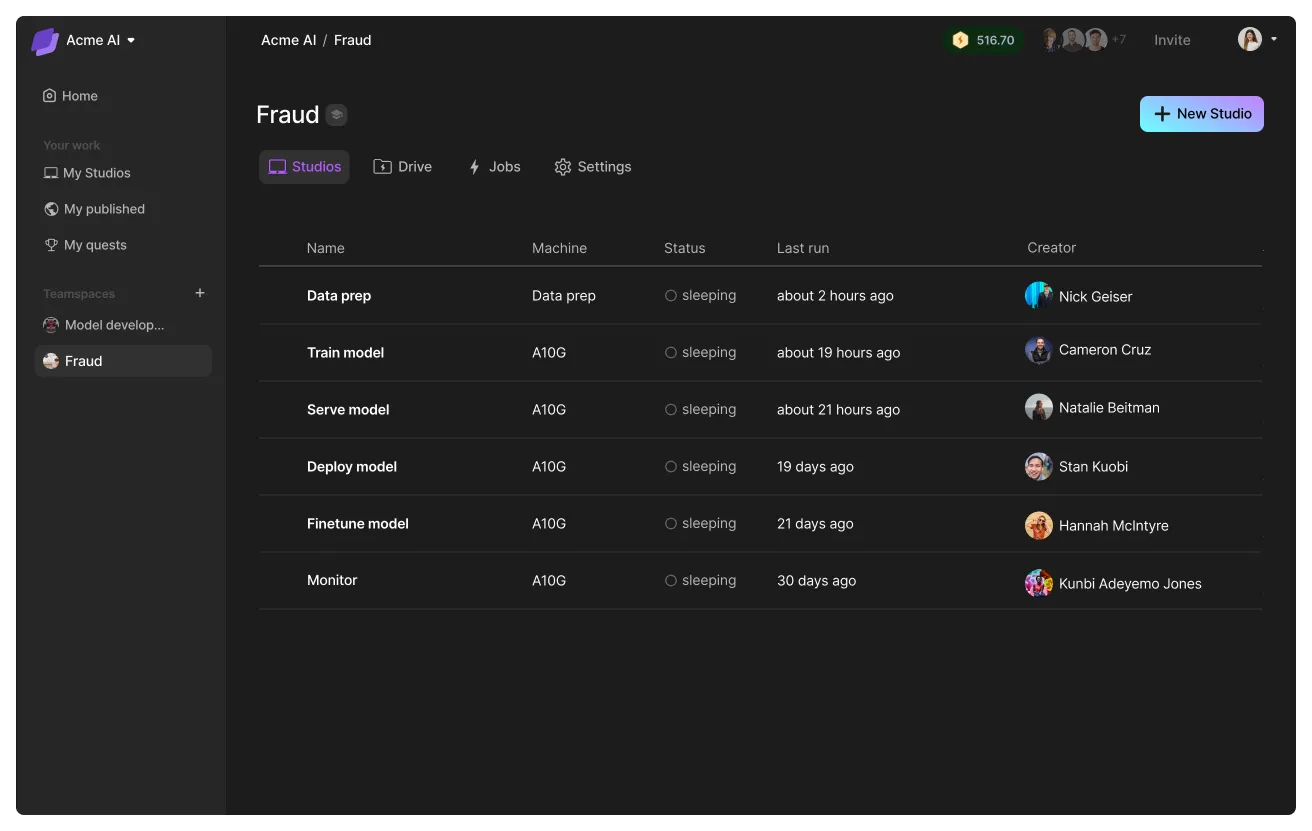
This approach enhances sharing and system construction through CI/CD pipelines, allowing Studios to connect and interact, such as serving prediction requests as an API endpoint. For additional information, explore our Public library or contact us directly.
Example: SDK pipeline
# login to the platform
# export LIGHTNING_USER_ID=000000-000000-000000-00000-000000000
# export LIGHTNING_API_KEY=111111-111111-111111-11111-111111111

from lightning_sdk import Machine, Studio

data_prep_studio = Studio("data_preparation")
data_prep_studio.start(Machine.DATA_PREP)

data_prep_studio.run("python prepare_data.py")
data_prep_studio.stop()

train_studio = Studio("training")
train_studio.start(Machine.V100_X_4)
train_studio.run("python train.py --data_path /teamspace/studios/data_preparation/preprocessed_data")
train_studio.stop()

deploy_studio = Studio("deploy")
deploy_studio.start(Machine.T4)
deploy_studio.run("python deploy_server.py --checkpoint /teamspace/studios/training/checkpoints/last.ckpt") # leave it running to serve requests
Was this page helpful?
Thanks for the feedback.